Cloud computing has changed how organizations build, deploy, and scale software. Among the three core cloud service models, Platform as a Service (PaaS) is often the least understood, even though it drives much of modern application development. If you’ve ever wondered what is PaaS, how it differs from IaaS and SaaS, and whether it fits your business, this guide explains it in plain terms.
What Is PaaS? A Simple Definition
Platform as a Service (PaaS) is a cloud computing model in which a provider delivers a complete development and deployment environment over the internet. That environment includes the hardware, operating systems, middleware, runtimes, databases, and development tools. You get a ready-made platform where you can write, test, deploy, and manage applications without buying, configuring, or maintaining the underlying infrastructure.
Think of it like renting a fully equipped professional kitchen. You bring your recipes and ingredients (your code and data), and the kitchen owner handles the ovens, plumbing, electricity, and maintenance. You focus on cooking. The provider keeps everything running.
With PaaS, developers stop worrying about server patching, OS updates, capacity planning, or runtime installs. They focus on what creates business value: building great applications.
How PaaS Works
A PaaS offering sits between raw infrastructure and finished software. The provider hosts the platform in its data centers and exposes it to customers through a web console, command-line tools, or APIs.
A typical PaaS environment includes:
- Infrastructure: Servers, storage, and networking managed by the provider.
- Operating systems and virtualization: Patched, secured, and maintained on your behalf.
- Middleware and runtimes: Language environments such as Java, Python, Node.js, .NET, Go, or PHP.
- Databases and data services: Managed relational and NoSQL databases, caching, and messaging.
- Development tools: Version control integration, CI/CD pipelines, testing tools, and monitoring dashboards.
- Scaling and load balancing: Automatic resource adjustment based on traffic.
A developer pushes code to the platform, and the PaaS handles the build, deployment, hosting, and scaling. When traffic spikes, the platform adds capacity. When demand drops, it scales back, and you typically pay only for what you use.
PaaS vs. IaaS vs. SaaS: Understanding the Cloud Stack
To fully understand PaaS, it helps to see where it sits among the three main cloud service models. The core difference is how much you manage versus how much the provider manages.
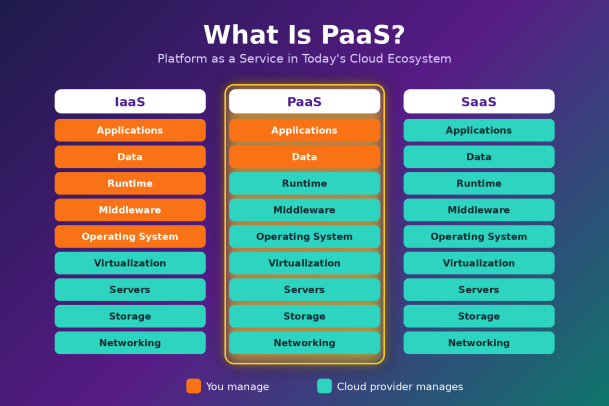
Infrastructure as a Service (IaaS) gives you virtualized computing resources such as servers, storage, and networks. You still manage the operating system, middleware, runtime, data, and applications. IaaS offers maximum control but requires the most technical effort.
Platform as a Service (PaaS) goes a step further. The provider manages everything from the hardware up through the runtime. You manage only your applications and data. This makes PaaS the sweet spot for development teams who want flexibility without infrastructure overhead.
Software as a Service (SaaS) delivers complete, ready-to-use applications over the internet. The provider manages everything, and you simply log in and use the software. Email platforms, CRM tools, and collaboration suites are common examples.
In short, IaaS is for those who want to build the house, PaaS is for those who want to furnish it, and SaaS is for those who want to move straight in.
Key Benefits of PaaS
1. Faster Time to Market
PaaS removes the weeks or months usually spent provisioning servers and configuring environments. Developers can launch new projects in minutes, experiment quickly, and ship features faster than competitors running traditional infrastructure.
2. Reduced Operational Costs
Because the provider owns and maintains the infrastructure, organizations avoid large capital expenses for hardware and reduce the staff time spent on system administration. Pay-as-you-go pricing aligns costs with actual usage.
3. Built-In Scalability
PaaS platforms are designed to scale automatically. Whether you’re serving a hundred users or a million, the platform adjusts resources to match demand, which is ideal for businesses with seasonal or unpredictable traffic.
4. Developer Productivity
Pre-configured tools, templates, and integrated services let developers focus on writing code instead of wrestling with configuration. Many platforms also support collaboration across distributed teams, which is essential in today’s hybrid work environment.
5. Support for Modern Architectures
PaaS works naturally with microservices, containers, APIs, and DevOps practices. Many platforms include built-in CI/CD pipelines, making continuous integration and delivery far easier to adopt.
6. Simplified Maintenance
Operating system patches, runtime updates, and infrastructure upgrades are handled by the provider. This reduces the risk of outdated software and frees internal teams from routine maintenance.
Common Types of PaaS
PaaS isn’t one-size-fits-all. Several variations have emerged to serve different needs:
- Public PaaS: Hosted on a public cloud and shared across many customers. It’s cost-effective and highly scalable.
- Private PaaS: Deployed within an organization’s own data center or private cloud, offering more control for regulated industries.
- Hybrid PaaS: Combines public and private deployments, letting organizations balance flexibility with compliance.
- Communication PaaS (CPaaS): Lets developers add voice, video, and messaging features to applications through APIs.
- Mobile PaaS (MPaaS): Provides tools for building, testing, and managing mobile applications.
- Integration PaaS (iPaaS): Connects applications, data, and processes across cloud and on-premises systems.
- Low-code and no-code PaaS: Enables business users and “citizen developers” to build applications with visual tools and minimal coding.
Real-World Use Cases for PaaS
Organizations of all sizes use PaaS to solve practical problems:
- Web and mobile application development: Startups and enterprises alike build and host customer-facing apps without managing servers.
- API development and management: Teams create, publish, and secure APIs that connect internal systems and partner ecosystems.
- Data analytics and business intelligence: Managed data services help companies process and analyze large datasets for real-time insights.
- IoT applications: PaaS environments support device connectivity, data ingestion, and analytics at scale.
- Legacy application modernization: Businesses migrate aging applications to cloud-native architectures to improve agility and reduce technical debt.
Challenges and Limitations of PaaS
While PaaS offers significant advantages, it’s important to understand its trade-offs before committing.
Vendor lock-in is one of the most common concerns. Applications built around a specific provider’s proprietary services and APIs can be difficult to migrate later. Choosing platforms that support open standards and containers helps reduce this risk.
Less control over infrastructure can be a limitation for workloads that need specific OS configurations, custom hardware, or fine-tuned performance settings.
Integration complexity can arise when connecting PaaS applications to existing on-premises systems, especially in organizations with extensive legacy environments.
Security and compliance responsibilities don’t disappear. This is the most critical point, and it deserves a closer look.
PaaS Security: The Shared Responsibility Model
A common misconception is that moving to PaaS means the provider handles all security. In reality, cloud security follows a shared responsibility model. The provider secures the underlying infrastructure, including physical data centers, networks, hypervisors, and the platform itself. The customer remains responsible for securing their applications, data, user access, and configurations.
This means organizations using PaaS must still address:
- Application security: Vulnerabilities in your code, such as injection flaws or insecure dependencies, are your responsibility.
- Identity and access management: Weak credentials, excessive permissions, and misconfigured roles are leading causes of cloud breaches.
- Data protection: Encryption, data classification, and backup strategies must be defined and enforced by you.
- Configuration management: Misconfigured storage, open ports, and exposed secrets are frequent entry points for attackers.
- Endpoint security: Developer laptops and devices accessing the platform can become gateways for malware and credential theft.
As attackers increasingly target cloud environments, organizations need a security strategy that extends from the endpoint to the cloud. Zero-trust principles, continuous monitoring, and proactive threat containment are no longer optional. They are essential for protecting the applications and data that PaaS makes so easy to build and deploy.
How to Choose the Right PaaS Provider
When evaluating PaaS options, consider these factors:
- Language and framework support: Make sure the platform supports your team’s preferred technologies.
- Scalability and performance: Look for proven auto-scaling and global availability.
- Security and compliance: Verify certifications relevant to your industry and review the provider’s security controls.
- Portability: Favor platforms that support containers and open standards to reduce lock-in.
- Pricing transparency: Understand how costs grow as your usage scales.
- Integration capabilities: Confirm the platform connects smoothly with your existing tools and systems.
- Support and documentation: Strong developer resources and responsive support save time and frustration.
The Future of PaaS
PaaS continues to evolve alongside broader cloud trends. Serverless computing, AI-powered development tools, container orchestration, and edge computing are all blending into modern PaaS offerings. Low-code platforms are widening access to application development, while AI assistants are helping developers write, test, and secure code faster. As these capabilities mature, PaaS will remain central to how organizations innovate, provided they pair that speed with strong, modern security.
Final Thoughts
So, what is PaaS? It’s a cloud model that gives development teams a complete, managed platform to build and run applications without the burden of maintaining infrastructure. It speeds up delivery, lowers costs, and supports modern architectures. But the convenience of PaaS comes with a responsibility: securing your applications, data, users, and endpoints remains firmly in your hands.
The organizations that get the most from PaaS are those that pair cloud agility with a proactive, zero-trust security posture that stops threats before they can cause damage.
Protect Your Cloud Applications with Xcitium
Building on PaaS shouldn’t mean exposing your business to new risks. Xcitium helps organizations secure endpoints and cloud workloads with patented zero-trust containment technology, stopping unknown threats and ransomware before they can do harm. See how Xcitium can strengthen your cloud security strategy and protect the applications your business depends on.
Please give us a star rating based on your experience.

 (25 votes, average: 2.24 out of 5, rated)


