Every laptop, desktop, server, and mobile device connected to your network is a potential doorway for attackers. With hybrid work now the norm, those doorways are scattered across home offices, coffee shops, and cloud environments, far beyond the reach of the traditional network perimeter. That is why choosing the right endpoint security tool has become one of the most important decisions an IT or security team will make.
The challenge is that the market is crowded. Dozens of vendors promise “next-gen” protection, AI-powered detection, and zero-day defense. On paper, many products look alike. In practice, the differences in detection quality, performance impact, management overhead, and total cost can be dramatic.
A poorly chosen endpoint security tool can leave gaps that ransomware slips through, bog down employee devices, or bury your team in false alerts. A well-chosen one quietly stops threats, gives you clear visibility, and scales with your business.
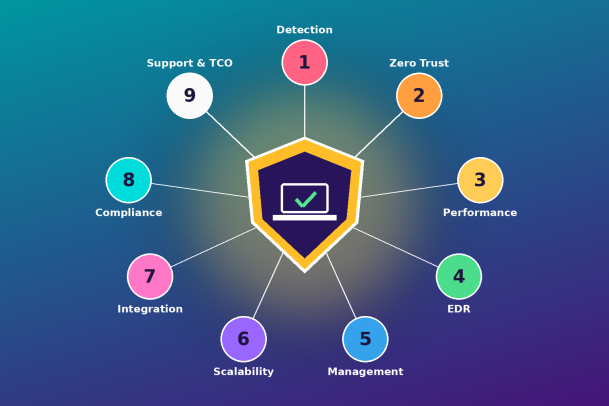
To help you cut through the noise, here are nine factors to consider while selecting an endpoint security tool for your organization.
1. Threat Detection and Prevention Capabilities
The core job of any endpoint security tool is to stop threats before they cause damage. Signature-based antivirus alone is no longer enough, because modern attacks use fileless malware, polymorphic code, and living-off-the-land techniques that never match a known signature.
Look for a tool that layers multiple detection methods: behavioral analysis, machine learning, exploit prevention, and threat intelligence feeds. Ask vendors how they handle zero-day threats and unknown files, not just known malware. Independent test results from labs such as AV-TEST, AV-Comparatives, or MITRE ATT&CK Evaluations are a useful reality check against marketing claims.
The best tools focus on prevention first. Detecting an attack after it has encrypted your file servers is far less valuable than blocking it at the point of execution.
2. Zero Trust Architecture and Containment
Most endpoint tools operate on a “default allow” model: a file is permitted to run unless it is recognized as malicious. The weakness is obvious. Any threat that is new or cleverly disguised gets through until detection catches up.
A Zero Trust approach flips this logic. Unknown files are treated as untrusted until verified. Technologies such as auto-containment let unknown applications run inside an isolated virtual environment, so users can keep working while the file is analyzed, and the file cannot touch the real system, registry, or network resources.
When evaluating an endpoint security tool, ask a simple question: what happens to a file the product has never seen before? If the answer is “it runs normally until something flags it,” you are accepting risk. Containment-based protection closes that window entirely.
3. Performance and System Impact
Security that slows devices to a crawl will be resented, worked around, or disabled. Endpoint agents must protect without consuming excessive CPU, memory, or disk I/O.
During evaluation, measure boot times, application launch speeds, and resource usage during full scans on the actual hardware your employees use, including older machines. Lightweight agents with cloud-assisted analysis typically have a smaller footprint than tools that run heavy local scanning engines.
Also check how the agent behaves during updates. Large, frequent definition downloads can strain bandwidth for remote workers on slower connections.
4. Endpoint Detection and Response (EDR) and Visibility
Prevention will never be perfect, so your endpoint security tool must also help you see what is happening and respond fast. Endpoint Detection and Response (EDR) capabilities record process activity, network connections, file changes, and user behavior, giving analysts the context they need to investigate incidents.
Key EDR features to look for include real-time telemetry, attack-chain visualization, threat hunting queries, and one-click response actions such as isolating a device, killing a process, or rolling back changes. Some vendors also offer Managed Detection and Response (MDR), where their own security analysts monitor your environment around the clock. For lean IT teams without a 24/7 security operations center, MDR can be a deciding factor.
Visibility matters beyond incidents, too. A good tool shows you every device, its patch status, installed software, and risk posture from a single view.
5. Centralized Management and Ease of Use
Even the most powerful endpoint security tool will fail if your team cannot manage it effectively. A clean, centralized console should let administrators deploy agents, set policies, review alerts, and generate reports without jumping between multiple screens or products.
Prioritize cloud-based management if you have remote or distributed users. It removes the need for on-premises servers and keeps devices protected and updated wherever they connect from. Look for role-based access control, policy templates, automated remediation, and clear alert prioritization that separates genuine threats from noise.
Request a hands-on trial. Ten minutes inside the console will tell you more about day-to-day usability than any feature sheet.
6. Scalability and Platform Coverage
Your business will grow, and your endpoint mix will change. The tool you select today should protect 50 devices or 50,000 without a painful re-architecture.
Check which operating systems are supported: Windows, macOS, Linux, iOS, and Android, as well as servers, virtual machines, and cloud workloads. Gaps in coverage become blind spots attackers will find. Also confirm how licensing scales, whether multi-tenant management is available for managed service providers or multi-site organizations, and how quickly new devices can be onboarded.
7. Integration With Your Security Ecosystem
An endpoint security tool should not operate as an island. It needs to share data and coordinate actions with the rest of your security stack, including SIEM platforms, firewalls, identity providers, email security, and ticketing systems.
Ask vendors about open APIs, native integrations, and support for standards such as syslog and STIX/TAXII threat intelligence formats. Tools that fit into an Extended Detection and Response (XDR) strategy can correlate signals across endpoints, networks, and cloud services, helping you spot multi-stage attacks that look harmless in isolation.
Strong integration also reduces manual work. When an endpoint alert can automatically open a ticket, enrich it with context, and trigger a containment action, your team responds in minutes instead of hours.
8. Compliance and Reporting Support
Many organizations must meet regulatory requirements such as GDPR, HIPAA, PCI DSS, ISO 27001, or SOC 2. Endpoint protection is a standard control in almost every one of these frameworks, and auditors will expect evidence that it is deployed and working.
Choose a tool that provides detailed audit logs, customizable compliance reports, and policy enforcement for controls such as device encryption, USB restrictions, and application control. Data residency options matter too if you operate in regions with strict rules about where security telemetry can be stored.
Good reporting is not only for auditors. Clear executive dashboards help you show leadership the value of your security investment in plain terms.
9. Vendor Reputation, Support, and Total Cost of Ownership
The sticker price of an endpoint security tool rarely tells the full story. Total cost of ownership (TCO) includes licensing, deployment effort, infrastructure, staff time spent managing alerts, training, and the cost of any breach the tool fails to stop.
Research the vendor’s track record. How long have they been in the market? What do customer reviews on platforms like Gartner Peer Insights say? How quickly do they ship updates for new threats? Equally important is support quality: 24/7 availability, response time commitments, and access to experienced security engineers when you need them most.
Some vendors also back their products with warranties against breaches, which signals confidence in their technology and transfers part of the financial risk away from you.
Final Thoughts: Choose Protection That Stops Threats, Not Just Detects Them
Selecting an endpoint security tool is not about finding the product with the longest feature list. It is about finding the right balance of strong prevention, real visibility, low system impact, easy management, and a vendor you can trust for the long haul.
Use these nine factors as your evaluation checklist: threat detection and prevention, Zero Trust containment, performance, EDR and visibility, centralized management, scalability, integration, compliance support, and vendor reputation with total cost of ownership. Score each shortlisted vendor against them, run a real-world proof of concept, and involve both your security and IT operations teams in the decision.
The threat landscape will keep evolving. The endpoint security tool you choose should evolve with it, closing the gaps attackers rely on rather than reacting after the damage is done.
Ready to See Zero Trust Endpoint Protection in Action?
Xcitium’s endpoint security platform combines patented auto-containment, EDR, and managed detection and response to stop unknown threats before they can cause harm, without slowing your users down. See how it measures up against all nine factors in a live walkthrough tailored to your environment.
Request a Demo with Xcitium and take the first step toward endpoints that are protected by design.
Please give us a star rating based on your experience.


 (23 votes, average: 2.35 out of 5, rated)


