What Is a Spear Phishing Attack? A Complete Guide for Security-Focused Leaders
Updated on February 2, 2026, by Xcitium
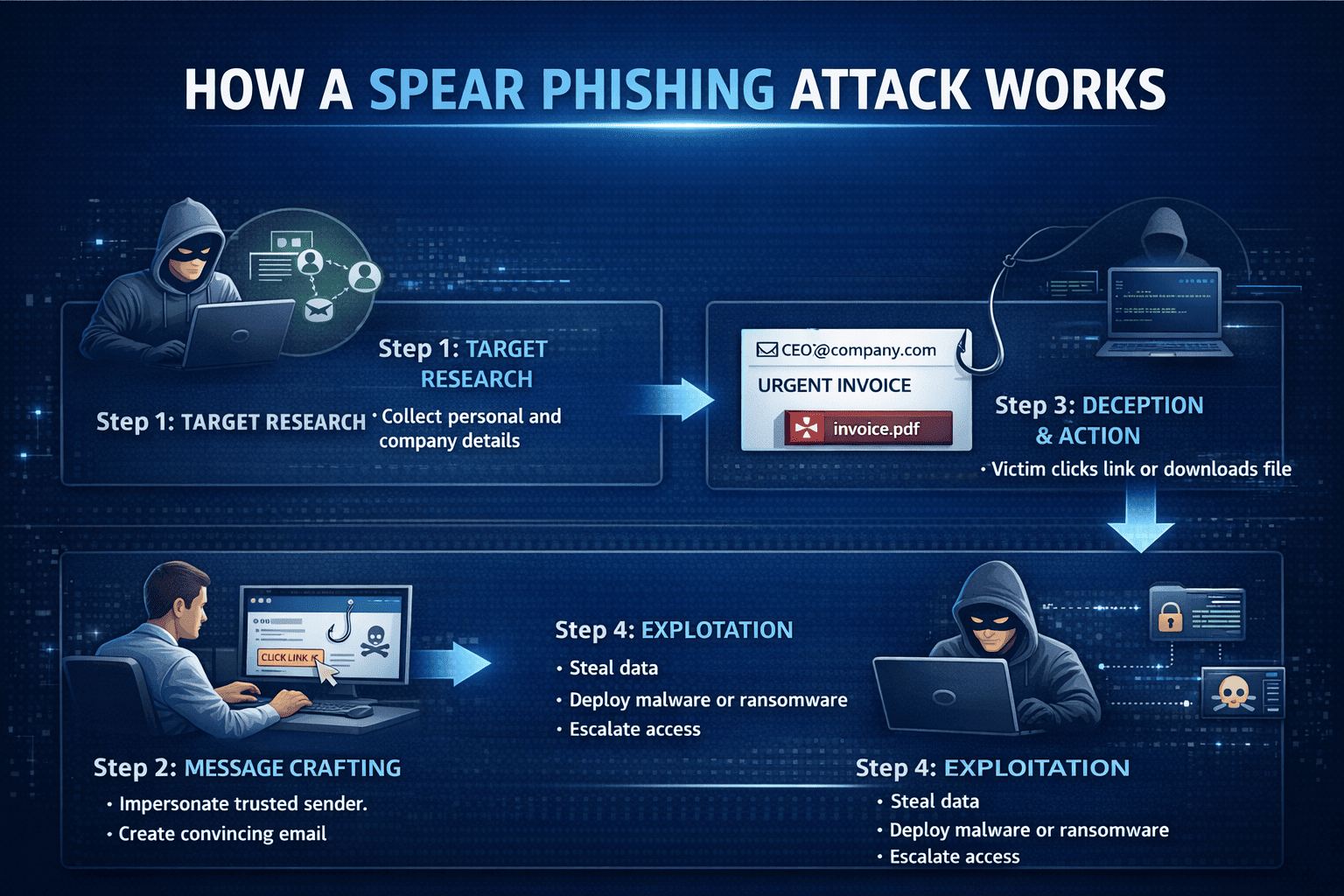
Cyberattacks don’t always start with malware or brute force. Often, they begin with a single, well-crafted email. If you’ve ever wondered what is a spear phishing attack, you’re not alone—and you’re right to be concerned.
A spear phishing attack targets specific individuals inside an organization, often executives, IT managers, or security teams. These attacks are highly personalized, difficult to detect, and responsible for some of the most damaging data breaches worldwide. For cybersecurity professionals and business leaders alike, understanding spear phishing is critical to protecting sensitive systems and data.
In this guide, we’ll break down what a spear phishing attack is, how it works, real-world examples, and how organizations can defend against it effectively.
What Is a Spear Phishing Attack?
A spear phishing attack is a targeted cyberattack where attackers impersonate a trusted individual or organization to trick a specific victim into revealing sensitive information or performing a malicious action.
Unlike generic phishing emails sent to thousands of users, spear phishing is highly customized. Attackers research their targets using social media, company websites, and public records to make messages appear legitimate.
In simple terms, when asking what is a spear phishing attack, the answer is:
A spear phishing attack is a personalized phishing attempt designed to deceive a specific individual or organization.
How Spear Phishing Attacks Work
Understanding how these attacks unfold helps security teams identify them faster.
Step 1: Target Research
Attackers gather details such as:
-
Job titles and responsibilities
-
Email formats
-
Vendors, partners, or internal systems
-
Recent company news
Step 2: Message Crafting
Using this information, attackers create convincing messages that may appear to come from:
-
A CEO or senior executive
-
IT support or HR
-
A trusted vendor or partner
Step 3: Deception and Action
Victims are prompted to:
-
Click a malicious link
-
Download a weaponized attachment
-
Share credentials or financial data
Step 4: Exploitation
Once successful, attackers may:
-
Access internal systems
-
Steal data
-
Deploy malware or ransomware
-
Escalate privileges
This is why spear phishing remains one of the most effective attack vectors.
Spear Phishing vs Phishing vs Whaling
To fully understand what is a spear phishing attack, it helps to compare it with similar threats.
| Attack Type | Target | Level of Personalization |
|---|---|---|
| Phishing | Broad audience | Low |
| Spear Phishing | Specific individuals | High |
| Whaling | Executives/CEOs | Very High |
Whaling is essentially spear phishing aimed at senior leadership, often involving financial fraud or strategic data theft.
Why Spear Phishing Is So Dangerous
Spear phishing attacks succeed because they exploit trust and authority, not just technical vulnerabilities.
Key Reasons They’re Effective:
-
Appear highly credible
-
Bypass traditional email filters
-
Exploit human psychology
-
Target high-value users
According to industry reports, spear phishing is responsible for a significant percentage of enterprise data breaches and business email compromise (BEC) incidents.
Common Spear Phishing Attack Examples
Real-world scenarios help clarify what is a spear phishing attack in practice.
Example 1: Fake Executive Request
An attacker impersonates a CEO requesting an urgent wire transfer from the finance team.
Example 2: Credential Harvesting
An email appears to come from IT asking users to “reset their password” via a malicious link.
Example 3: Vendor Invoice Fraud
Attackers pose as a known vendor and send altered payment instructions.
Each scenario leverages familiarity and urgency to bypass scrutiny.
Industries Most Targeted by Spear Phishing
While any organization can be targeted, some industries face higher risk:
-
Financial services
-
Healthcare
-
Technology and SaaS
-
Manufacturing and supply chain
-
Government and education
For IT managers and CISOs, understanding industry-specific risk patterns is essential.
How to Identify a Spear Phishing Attack
Training employees to recognize warning signs is one of the strongest defenses.
Red Flags to Watch For:
-
Urgent or threatening language
-
Requests for sensitive data
-
Unexpected attachments or links
-
Slight domain or spelling variations
-
Requests that bypass normal procedures
Even well-trained professionals can fall victim without layered security controls.
How to Prevent Spear Phishing Attacks
Preventing spear phishing requires a combination of technology, training, and process.
1. Employee Awareness Training
Regular training helps users recognize and report suspicious messages.
2. Email Security Solutions
Advanced email filtering and threat detection reduce exposure.
3. Multi-Factor Authentication (MFA)
MFA limits damage even if credentials are compromised.
4. Zero Trust Principles
Verify every request—especially those involving access or payments.
5. Incident Response Planning
Prepared teams respond faster and reduce impact.
Understanding what is a spear phishing attack is only effective when paired with proactive defense strategies.
The Role of Automation and AI in Spear Phishing Defense
Modern spear phishing attacks often use automation and AI to scale personalization. Defenders must respond with equally advanced tools.
Key Capabilities to Look For:
-
Behavioral analysis
-
Real-time threat intelligence
-
Automated containment
-
Continuous monitoring
Security teams that rely solely on manual review are at a disadvantage.
Actionable Tips for IT Managers and Executives
-
Enforce least-privilege access
-
Validate financial requests through secondary channels
-
Regularly test staff with phishing simulations
-
Monitor executive email accounts closely
-
Integrate email security with SOC workflows
Small improvements can significantly reduce risk.
FAQ: Spear Phishing Attacks Explained
1. What is a spear phishing attack in cybersecurity?
It is a targeted phishing attack aimed at specific individuals using personalized messages.
2. How is spear phishing different from phishing?
Spear phishing is targeted and personalized, while phishing is mass-distributed.
3. Can spear phishing bypass email security?
Yes. Its personalization makes it harder for traditional filters to detect.
4. Who is most at risk of spear phishing attacks?
Executives, IT staff, finance teams, and system administrators.
5. What should I do if I suspect a spear phishing email?
Do not click links, report it immediately, and follow incident response procedures.
Why Understanding Spear Phishing Is a Business Imperative
Knowing what is a spear phishing attack is no longer optional. These attacks target people—not just systems—and can lead to financial loss, reputational damage, and regulatory consequences.
Organizations that invest in education, visibility, and advanced security controls are far better positioned to stop targeted phishing attacks before damage occurs.
Strengthen Your Defense Against Targeted Phishing Attacks
If spear phishing is one of your top concerns, it’s time to take a proactive approach to threat prevention and response.
👉 Request a demo today:
https://www.xcitium.com/request-demo/
Discover how advanced security visibility and automation can help protect your organization from modern phishing threats.