What Is a .TMZ File? A Complete Guide for Security Leaders and IT Teams
Updated on December 26, 2025, by Xcitium
Have you ever received a file with a .tmz extension and wondered whether it’s safe to open? You’re not alone. Many IT managers and cybersecurity professionals ask the same question—especially when unusual file extensions appear in enterprise environments.
Understanding what is a .tmz file is critical in today’s threat landscape, where malicious files often masquerade as legitimate ones. In this guide, we’ll break down what a .tmz file is, how it’s used, its security implications, and how organizations can safely manage it without increasing risk.
Whether you’re an IT manager, cybersecurity professional, or business leader, this article will help you make informed decisions.
What Is a .TMZ File?
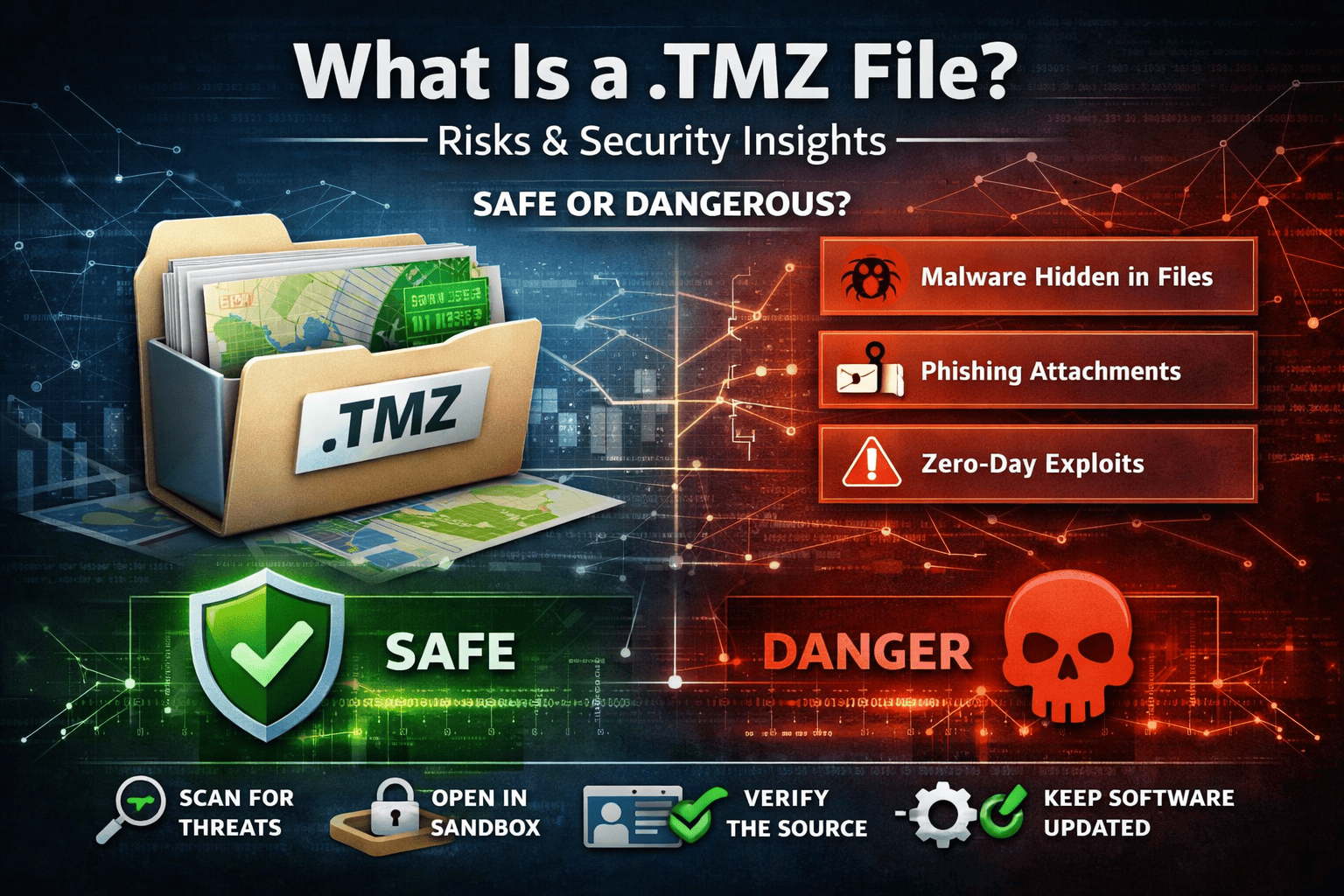
A .tmz file is a compressed archive file primarily associated with Trimble mapping and geospatial software, such as Trimble Business Center and other GIS-related tools. The file is typically used to package map data, geographic information, or project configurations into a single compressed container.
In simple terms, when someone asks what is a .tmz file, the answer is:
It’s a compressed mapping or geospatial data file used mainly in engineering, construction, and surveying applications.
However, like many compressed file formats, .tmz files can also be misused if handled improperly.
How Does a .TMZ File Work?
A .tmz file works similarly to other compressed file formats such as ZIP or RAR. It bundles multiple files—often maps, layers, metadata, and configuration data—into one portable archive.
Typical Contents of a .TMZ File
-
Geospatial datasets
-
Map layers and overlays
-
Project-specific metadata
-
Configuration files
Because of this structure, .tmz files are widely used to share location-based data efficiently between teams.
Legitimate Use Cases for .TMZ Files
Understanding legitimate use cases helps differentiate safe files from suspicious ones.
Common Industries That Use .TMZ Files
-
Construction & Engineering
-
Surveying and Mapping
-
Urban Planning
-
Geographic Information Systems (GIS)
For example, an engineering firm may send a .tmz file containing terrain data to a construction team. In this case, the file is perfectly legitimate.
Is a .TMZ File Dangerous?
Here’s where security teams need to pay attention.
While a .tmz file itself is not inherently malicious, it can become dangerous depending on its source and contents. Cybercriminal often exploit lesser-known file extensions because users are less familiar with them.
Why .TMZ Files Can Be Risky
-
They are compressed containers, which can hide malicious payloads
-
Security tools may apply less scrutiny to uncommon extensions
-
Users may open them without proper validation
This makes understanding TMZ file security risks especially important for enterprises.
Common Security Risks Associated with .TMZ Files
1. Malware Concealment
Attackers can embed malicious scripts or executables inside a .tmz archive. Once extracted, those files can execute harmful actions.
2. Phishing Campaigns
Emails may include .tmz attachments disguised as legitimate project files to trick employees into opening them.
3. Zero-Day Exploits
If the application used to open a .tmz file has vulnerabilities, attackers can exploit them before patches are available.
How to Open a .TMZ File Safely
If you must open a .tmz file, follow these best practices to minimize risk.
Step-by-Step Safety Checklist
-
Verify the sender – Confirm the file source through a trusted channel
-
Scan with advanced security tools – Use behavior-based detection, not just signature-based antivirus
-
Open in a sandboxed environment – Never open unknown files on production systems
-
Keep software updated – Ensure GIS and mapping tools are fully patched
These steps significantly reduce the chance of encountering TMZ file malware.
Why IT Managers Should Care About .TMZ Files
From an IT governance perspective, obscure file extensions like .tmz represent blind spots in security policies.
Key Concerns for IT Teams
-
Limited user awareness
-
Inconsistent file-handling policies
-
Lack of visibility into compressed content
Ignoring these risks can lead to serious consequences, including data breaches or ransomware infections.
Best Practices for Managing .TMZ Files in Enterprises
1. Enforce File Type Policies
Restrict which file extensions are allowed via email and downloads.
2. Use Zero Trust File Execution
Assume every file is untrusted until proven otherwise.
3. Deploy Advanced Endpoint Protection
Traditional antivirus is no longer enough. Use solutions that analyze file behavior in real time.
4. Train Employees
Educate staff on uncommon file extensions and social engineering tactics.
How Cybersecurity Leaders Can Reduce File-Based Threats
Understanding what is a .tmz file is just one part of a broader strategy.
Modern attacks rely heavily on file-based delivery methods. Cybersecurity leaders must focus on prevention-first security, not just detection and response.
Strategic Security Measures
-
Real-time threat isolation
-
Application control and containment
-
Default-deny execution models
These approaches stop threats before damage occurs, even if the file is brand new.
The Role of Zero Trust in File Security
Zero Trust assumes no file, user, or device should be trusted automatically.
When applied to .tmz files:
-
Files run in isolated environments
-
Malicious behavior is blocked instantly
-
No system-wide damage occurs
This model is especially effective against unknown or rare file types.
FAQ: .TMZ Files Explained
1. What is a .tmz file used for?
A .tmz file is used to store and share compressed geospatial or mapping data, primarily in engineering and GIS applications.
2. Can a .tmz file contain malware?
Yes. While legitimate .tmz files are safe, attackers can hide malware inside them, making verification essential.
3. How do I open a .tmz file safely?
Always scan it with advanced security software and open it in a sandboxed or isolated environment.
4. Should companies block .tmz files?
Not necessarily. Instead of blocking them outright, apply Zero Trust controls and behavior-based inspection.
5. Are .tmz files common in cyberattacks?
They are not common, which is exactly why attackers may use them—to bypass traditional security filters.
Final Thoughts: Why Understanding .TMZ Files Matters
Knowing what is a .tmz file goes beyond basic file identification. It’s about recognizing how attackers exploit unfamiliar formats and how organizations can stay ahead.
For IT managers, cybersecurity professionals, and business leaders, proactive file security is no longer optional—it’s essential.
If your organization still relies on legacy antivirus or reactive security tools, it’s time to rethink your strategy.
👉 See how Xcitium’s Zero Trust, prevention-first platform stops unknown file threats—before they execute.
Request a demo today: https://www.xcitium.com/request-demo/