SKU stands for Stock Keeping Unit. It is a unique alphanumeric code a business assigns to each distinct product it sells or stores, so it can track inventory, sales, and movement with precision.
If you have ever looked at a price tag, a shelf label, or an online product listing and noticed a short string like “TS-BLU-M-2026,” you have seen a SKU in action. These codes look simple, but they sit at the heart of how modern retailers, warehouses, e-commerce stores, and even IT teams keep track of what they own.
In this guide, we answer the question “What does SKU stand for?” in full. You will learn what SKUs mean, how they are structured, how they differ from UPCs and serial numbers, why they matter, and how the same idea applies far beyond the retail floor.
What Does SKU Stand For? The Meaning Explained
A Stock Keeping Unit is an internal identifier that a business creates for its own use. Unlike universal barcodes, SKUs are not issued by any outside authority. Each company designs its own SKU system to match how it organizes products.
The key idea is distinctness. Every variation of a product that a customer might choose between gets its own SKU. A t-shirt sold in three colors and four sizes is not one SKU. It is twelve, because each combination is tracked, counted, and reordered separately.
SKUs are usually short, readable codes made of letters and numbers. They are often printed on labels alongside a scannable barcode, so staff can identify a product at a glance and systems can process it automatically.
How a SKU Is Structured
Most SKUs are built from short segments, each representing one product attribute. Read left to right, the code moves from the broadest detail to the most specific.
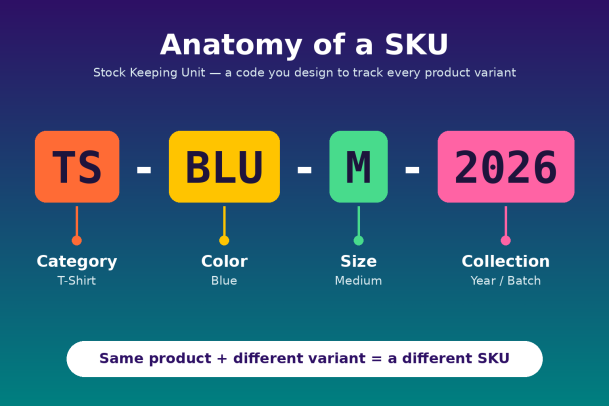
Take the example TS-BLU-M-2026:
- TS identifies the category (t-shirt).
- BLU identifies the color (blue).
- M identifies the size (medium).
- 2026 identifies the collection, season, or batch.
Other common segments include brand, material, supplier, warehouse location, or style number. There is no single correct format. What matters is that the structure is logical, consistent, and easy for your team to read without a lookup table.
SKU vs. UPC vs. Serial Number
SKUs are often confused with other product identifiers. Each one answers a different question, and most businesses use more than one.
| Identifier | Who creates it | What it identifies | Format | Main use |
|---|---|---|---|---|
| SKU | The business itself | A product variant within one company | Alphanumeric, custom | Internal inventory, sales, and reordering |
| UPC | Issued through GS1 | A product variant across all sellers | 12-digit number | Point-of-sale scanning, retail distribution |
| Serial number | The manufacturer | One individual unit | Unique per item | Warranty, returns, theft tracking, asset records |
The simplest way to remember it: a UPC tells the world what a product is, a SKU tells your business how you track it, and a serial number tells you exactly which single unit you are holding. Two stores selling the same blender share one UPC but likely use completely different SKUs.
Why SKUs Matter: Key Benefits
A well-designed SKU system turns scattered product data into something you can measure and act on. Here is what it delivers:
- Accurate inventory tracking. Every variant is counted on its own, so you know exactly how many blue medium shirts remain, not just “some shirts.”
- Smarter reordering. Sales data tied to SKUs shows which variants sell fastest, helping you restock before you run out and avoid overstocking slow movers.
- Faster fulfillment. Pickers and packers find the right item quickly, which reduces shipping errors and costly returns.
- Better sales analysis. SKU-level reports reveal trends by color, size, season, or supplier that product-level totals would hide.
- Smoother omnichannel selling. One consistent code links the same product across your physical store, website, and marketplaces.
- Improved customer service. Staff can check stock or locate a product instantly when a shopper asks.
In short, SKUs give every product an identity your systems can trust, and that trust is the foundation for good decisions.
SKUs Beyond Retail
The SKU concept started in retail, but the principle of giving every distinct item a unique, trackable identity is useful almost everywhere.
- Manufacturing: SKUs track raw materials, components, and finished goods through production and assembly.
- Healthcare: Hospitals use SKUs to manage medical supplies, equipment, and pharmaceuticals where shortages are not an option.
- Software and SaaS: Vendors assign SKUs to license tiers, subscription plans, and add-ons, which simplifies billing and renewals.
- Hospitality and food service: Restaurants and hotels track ingredients, linens, and supplies to control waste and cost.
SKUs in IT and Cybersecurity
IT teams face the same core challenge as retailers: you cannot manage what you cannot see. Laptops, servers, mobile devices, and software licenses all need clear identifiers so teams know what exists, where it lives, and who uses it.
This matters for security. Every unknown or untracked device is a potential entry point for attackers. Organizations that maintain accurate asset inventories, often using SKU-style categorization alongside serial numbers, can patch faster, spot unauthorized hardware, and respond to threats with confidence. Endpoint protection platforms build on this visibility to monitor and secure every device on the network.
Best Practices for Creating SKUs
A good SKU system is easy to read, easy to scale, and hard to misuse. Follow these guidelines when building yours:
- Keep it short. Aim for 8 to 12 characters. Long codes slow staff down and invite typos.
- Start broad, end specific. Put the category or brand first and the most detailed attribute last.
- Use letters and numbers only. Avoid spaces and special characters like / or *, which can break spreadsheets and software.
- Avoid confusing characters. The letter O and the number 0, or the letter I and the number 1, are easily mixed up.
- Don’t start with zero. Spreadsheet programs often drop leading zeros, silently changing your codes.
- Never reuse SKUs. Retire old codes permanently so historical sales data stays accurate.
- Document your format. Write down what each segment means so new team members can follow the system.
Common SKU Mistakes to Avoid
Even experienced teams fall into a few predictable traps:
- Using the manufacturer’s code as your SKU. It ties your system to a supplier you might change later and can create duplicates.
- Making SKUs too complex. Packing in every possible attribute produces codes no one can read.
- Inconsistent formats. If one team writes “BLU” and another writes “BL,” your reports will split the same product in two.
- Skipping SKUs for small variants. If customers can choose it, track it separately.
- No central ownership. Without one person or team responsible for creating SKUs, duplicates and errors multiply quickly.
Frequently Asked Questions
1. What does SKU stand for in retail?
In retail, SKU stands for Stock Keeping Unit. It is a unique code a store assigns to each product variant to track inventory and sales.
2. Is a SKU the same as a barcode?
No. A SKU is the code itself, created by the business. A barcode is a scannable image that can encode a SKU, a UPC, or other data.
3. Can two companies use the same SKU?
Yes. Because SKUs are internal, two businesses can use identical codes for completely different products without any conflict.
4. How many SKUs should a business have?
As many as it has distinct product variants. A small boutique might manage a few hundred, while a large retailer can track hundreds of thousands.
5. Do I need software to manage SKUs?
A spreadsheet works for very small catalogs. As you grow, inventory management or ERP software becomes essential to keep SKU data accurate and synced across channels.
Conclusion: Visibility Is Everything
So, what does SKU stand for? Stock Keeping Unit, a simple code with a powerful purpose. SKUs give every product a clear identity, helping businesses track inventory, forecast demand, fulfill orders accurately, and understand what truly drives sales.
The lesson extends well beyond the store shelf. Whether you are managing t-shirts, medical supplies, or thousands of company laptops, success starts with knowing exactly what you have. In IT, that visibility is also your first line of defense, because every unmanaged endpoint is a risk waiting to be exploited.
If you want the same precision for your organization’s devices that SKUs bring to inventory, Xcitium can help. Its endpoint security platform gives you full visibility into every device and stops threats before they cause damage.
Ready to see every endpoint and stop threats in their tracks?
Please give us a star rating based on your experience.

 (14 votes, average: 2.07 out of 5, rated)


