How to Clear Disk Space: A Complete Guide for Better Performance and Security
Updated on February 6, 2026, by Xcitium
Is your system constantly running out of space, slowing down, or throwing storage warnings at the worst possible time? If so, you’re not alone. Knowing how to clear disk space has become a critical skill for individuals and organizations alike as data volumes continue to grow.
From temporary files to forgotten backups and unused applications, disk space fills up faster than most people expect. Left unchecked, low disk space can lead to system crashes, performance issues, and even security risks. In this guide, we’ll walk through practical, safe, and effective ways to clear disk space—whether you’re managing a personal device or an enterprise environment.
What Does It Mean to Clear Disk Space?
Before diving into how to clear disk space, it helps to understand what disk space actually is. Disk space refers to the storage capacity on a hard drive or solid-state drive where operating systems, applications, and data are stored.
When disk space runs low:
-
Systems slow down
-
Updates fail to install
-
Applications crash or behave unpredictably
-
Security logs and backups may stop working
Clearing disk space means removing unnecessary files, optimizing storage usage, and ensuring only essential data remains.
Why Low Disk Space Is a Serious Problem
Understanding how to clear disk space is not just about convenience—it’s about system health and security.
Problems caused by low disk space:
-
Reduced system performance
-
Failed backups and log retention
-
Application instability
-
Increased risk during updates
-
Limited incident investigation data
For IT teams and executives, unmanaged disk space can quietly turn into a business risk.
How to Check What’s Using Disk Space
The first step in learning how to clear disk space is visibility. You need to know what’s consuming storage before removing anything.
Common storage hogs include:
-
Temporary system files
-
Old software installations
-
Log files
-
Cached data
-
Duplicate or outdated files
Most operating systems provide built-in tools to analyze disk usage, and third-party tools can offer deeper insights for enterprise environments.
How to Clear Disk Space Safely (Step by Step)
Clearing disk space should always be done carefully to avoid deleting critical files.
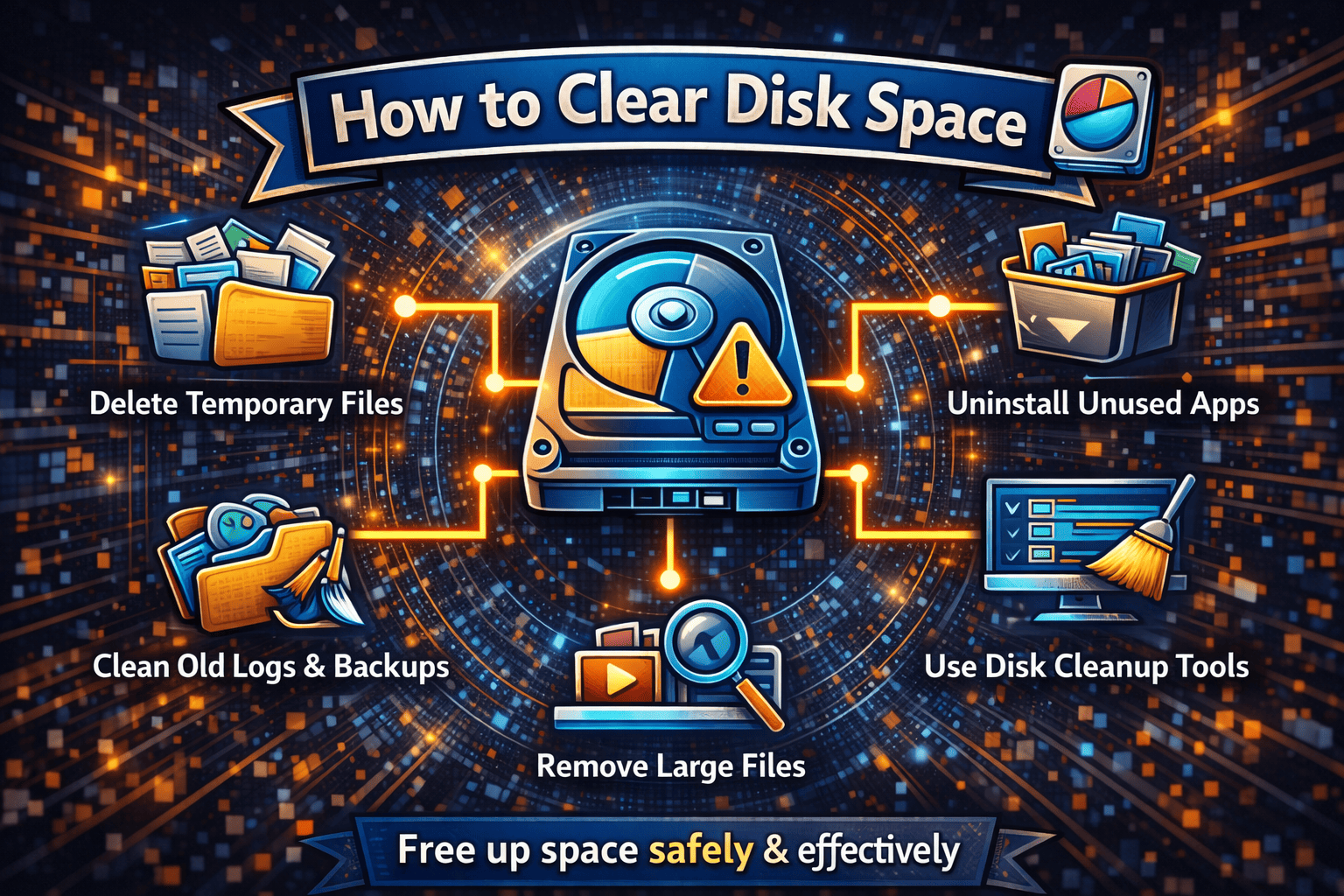
1. Delete Temporary and Cache Files
Temporary files accumulate quickly and are rarely needed long term.
-
Clear system temp folders
-
Remove browser cache files
-
Delete leftover installation files
This step alone can often free up gigabytes of space.
2. Uninstall Unused Applications
Many systems contain applications that haven’t been used in months—or years.
-
Review installed software
-
Remove unused or redundant tools
-
Eliminate outdated trial software
Uninstalling unused applications is one of the safest ways to clear disk space.
3. Clean Up Old Logs and Backups
Logs and backups are essential—but only up to a point.
-
Archive or delete outdated logs
-
Review backup retention policies
-
Move old backups to external storage
For businesses, improper log retention can also create compliance and security risks.
4. Identify and Remove Large Files
Large files often go unnoticed until disk space runs out.
-
Search for files over a certain size
-
Remove outdated videos, ISOs, and installers
-
Compress files that must be retained
This step is especially helpful for creative teams and developers.
5. Use Built-In Disk Cleanup Tools
Most operating systems include built-in disk cleanup utilities.
These tools can:
-
Remove system junk files
-
Clear update leftovers
-
Optimize storage automatically
Using built-in tools reduces the risk of accidental deletion.
How to Clear Disk Space on Business Systems
For organizations, knowing how to clear disk space goes beyond manual cleanup.
Enterprise best practices include:
-
Automated cleanup policies
-
Centralized storage monitoring
-
Log rotation and retention controls
-
Storage alerts and thresholds
Automation ensures disk space issues don’t interrupt critical operations.
Disk Space and Cybersecurity: The Hidden Connection
Low disk space is more than a performance issue—it’s a security concern.
Why disk space matters for security:
-
Logs may stop recording events
-
Forensic data may be lost
-
Security tools may fail to update
-
Incident investigations become harder
Clearing disk space ensures security visibility and operational resilience.
Cloud and Hybrid Storage Considerations
In cloud and hybrid environments, disk space issues still matter.
Cloud storage challenges include:
-
Overprovisioned volumes
-
Forgotten snapshots
-
Unused data stores
-
Cost overruns
Knowing how to clear disk space in cloud environments helps reduce costs while improving performance.
Common Mistakes to Avoid When Clearing Disk Space
Not all cleanup efforts are safe.
Avoid these common mistakes:
-
Deleting system files blindly
-
Removing active application data
-
Clearing logs without backups
-
Ignoring compliance requirements
When in doubt, archive before deleting.
Storage Optimization Best Practices
Clearing disk space once is helpful—but maintaining it is better.
Storage optimization tips:
-
Schedule regular disk cleanup
-
Monitor storage usage trends
-
Enforce data retention policies
-
Educate users on file management
Proactive storage management prevents emergencies.
How Often Should You Clear Disk Space?
There’s no one-size-fits-all answer.
General guidelines:
-
Personal devices: Monthly
-
Business systems: Weekly or automated
-
Critical servers: Continuous monitoring
Regular maintenance prevents sudden outages.
Tools That Help Clear Disk Space
Several tools can simplify the process.
Common tool categories:
-
Built-in OS cleanup tools
-
Storage analysis software
-
Log management platforms
-
Cloud cost optimization tools
Choose tools that align with your environment and security requirements.
FAQs About How to Clear Disk Space
1. How do I know if my disk space is too low?
Most systems warn users when disk space drops below safe thresholds, usually around 10–15% free space.
2. Is it safe to delete temporary files?
Yes. Temporary files are designed to be deleted and are one of the safest ways to clear disk space.
3. Can low disk space affect security?
Absolutely. Low disk space can stop logs, backups, and security tools from functioning properly.
4. How much free disk space should I keep?
Aim to keep at least 15–20% of disk space free for optimal performance.
5. Should disk cleanup be automated?
For businesses, automation is highly recommended to avoid downtime and human error.
Final Thoughts: Why Disk Space Management Matters
Understanding how to clear disk space is about more than freeing storage—it’s about keeping systems fast, secure, and reliable.
Without proper disk space management:
-
Systems slow down
-
Security visibility decreases
-
Operations become unstable
With proactive cleanup and optimization:
-
Performance improves
-
Security tools work properly
-
Downtime is avoided
Disk space may seem simple, but managing it well delivers real business value.
Take the Next Step Toward Better System Visibility
Want better control over system health, visibility, and security across your environment?
👉 Request a demo today:
https://www.xcitium.com/request-demo/
Discover how proactive monitoring and security-first visibility can keep your systems running at peak performance.