What Is Modem and What Is Router? A Complete Guide for Secure Connectivity
Updated on December 23, 2025, by Xcitium
Have you ever wondered why your internet suddenly slows down or why a security breach can start at your network edge? For many organizations, the answer begins with understanding what is modem and what is router. These two devices are the foundation of every internet connection, yet they are often misunderstood, misconfigured, or overlooked in cybersecurity planning.
For IT managers, cybersecurity professionals, and business leaders, knowing how modems and routers work is not just basic networking knowledge. It is critical to protecting data, ensuring uptime, and enabling secure digital growth. In this guide, we will break down everything you need to know in clear, practical terms.
Understanding the Basics: What Is Modem and What Is Router?
Before diving into security and performance, let’s start with the fundamentals. Understanding what is modem and what is router helps clarify how your internet connection actually reaches your devices.
What Is a Modem?
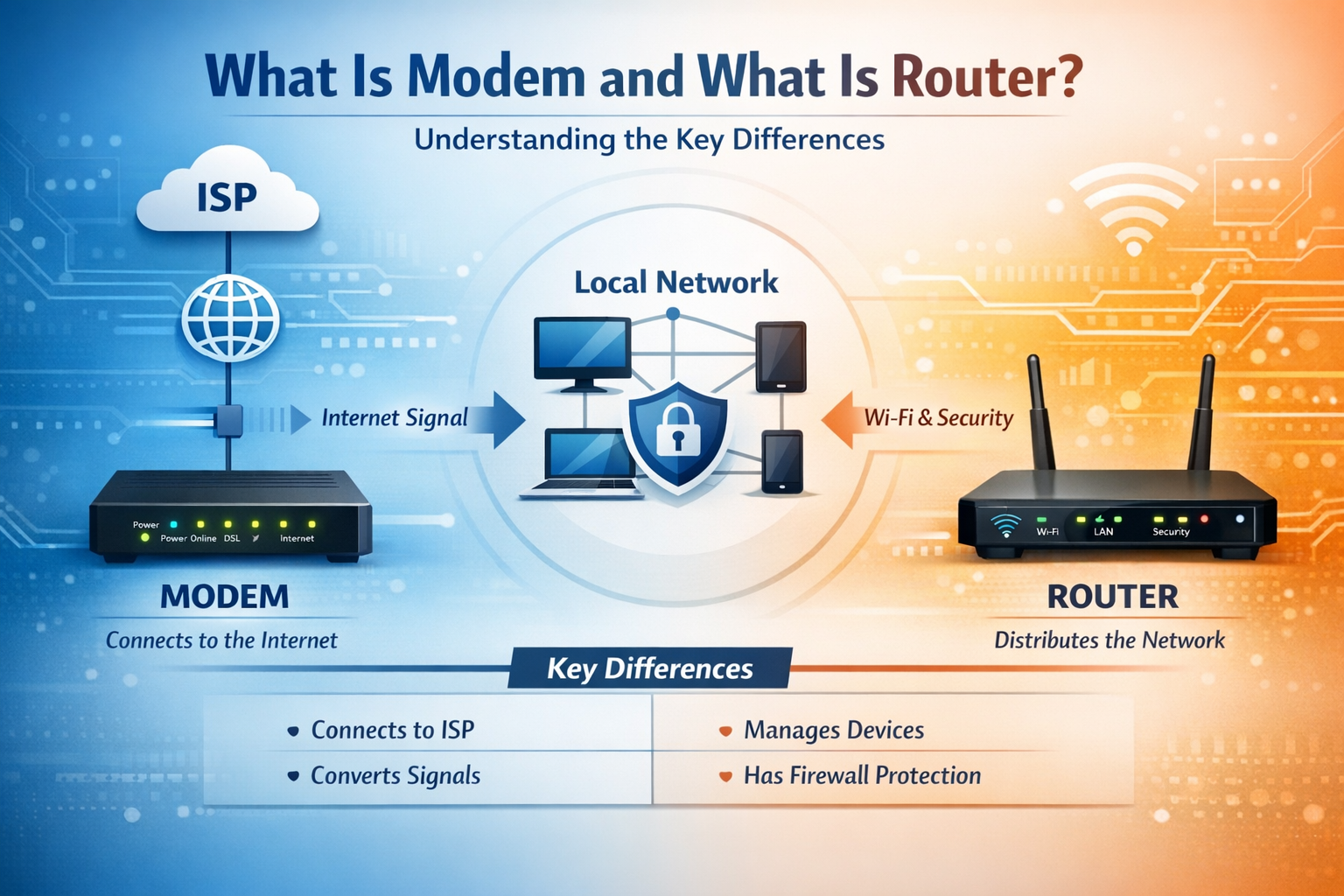
A modem (short for modulator-demodulator) is a device that connects your local network to your Internet Service Provider (ISP). It translates digital data from your computer into signals that can travel over phone lines, cable systems, or fiber networks, and vice versa.
In simple terms, the modem is your gateway to the internet. Without it, your internal network cannot communicate with the outside world.
Key functions of a modem include:
-
Connecting directly to the ISP
-
Converting incoming signals into usable data
-
Sending outgoing data back to the ISP
From a cybersecurity perspective, the modem represents the first external entry point into your network.
What Is a Router?
A router is a networking device that distributes the internet connection from the modem to multiple devices. It manages traffic, assigns IP addresses, and enforces basic security rules.
When people ask what is modem and what is router, the simplest explanation is this:
-
The modem brings the internet in
-
The router shares and manages it securely
Routers are essential for both wired and wireless networking within homes and businesses.
Modem vs Router: Key Differences Explained
Understanding the difference between a modem and a router is critical for IT planning and network security. While they work together, they serve very different roles.
Core Differences at a Glance
| Feature | Modem | Router |
|---|---|---|
| Connects to ISP | Yes | No |
| Distributes internet | No | Yes |
| Assigns local IPs | No | Yes |
| Firewall capabilities | Limited | Advanced |
| Handles multiple devices | No | Yes |
When evaluating what is modem and what is router, remember that security responsibility mostly lies with the router, not the modem.
Why the Difference Matters for Security
A modem typically has minimal security features. A router, on the other hand, can include:
-
Firewalls
-
Network segmentation
-
Intrusion prevention
-
VPN support
For organizations, relying only on ISP-provided equipment can leave serious gaps.
How Modems and Routers Work Together
To truly understand what is modem and what is router, you need to see how they function as a system.
Step-by-Step Internet Flow
-
Your ISP sends data to your modem
-
The modem converts signals into digital data
-
The router receives the data from the modem
-
The router directs traffic to the correct device
-
Security rules are applied at the router level
This process happens in milliseconds, but every step matters for performance and protection.
Combined Modem-Router Devices
Many ISPs provide combo devices that include both modem and router functionality. While convenient, they often lack advanced security controls.
Potential drawbacks include:
-
Limited firewall configuration
-
Delayed firmware updates
-
Reduced visibility for IT teams
For cybersecurity-focused organizations, separate enterprise-grade routers are often the better choice.
Why Modems and Routers Matter in Cybersecurity
For security leaders, understanding what is modem and what is router is foundational to network defense.
Common Security Risks
Misconfigured or outdated networking devices can expose organizations to:
-
Unauthorized access
-
Malware infections
-
Man-in-the-middle attacks
-
Data exfiltration
Attackers often target routers because they control traffic flow and device access.
Best Security Practices
To reduce risk, organizations should:
-
Change default credentials immediately
-
Disable unnecessary remote management
-
Update firmware regularly
-
Use strong encryption (WPA3 where possible)
-
Segment networks for sensitive assets
A secure router configuration is one of the most cost-effective cybersecurity measures available.
Choosing the Right Modem and Router for Your Business
Selecting the right equipment goes beyond speed and price. When considering what is modem and what is router, IT decision-makers should evaluate security, scalability, and control.
Key Factors to Consider
For Modems:
-
ISP compatibility
-
Support for cable, DSL, or fiber
-
Reliability and uptime
For Routers:
-
Built-in firewall capabilities
-
VPN and zero-trust support
-
Network monitoring and logging
-
Ability to integrate with security platforms
Enterprise vs Consumer Devices
Consumer-grade routers may be sufficient for small offices, but they often lack:
-
Advanced threat detection
-
Centralized management
-
Compliance-ready logging
For IT managers and CEOs, investing in secure networking hardware reduces long-term risk.
Modems, Routers, and Zero Trust Security
Modern cybersecurity frameworks increasingly adopt Zero Trust principles. Understanding what is modem and what is router helps align infrastructure with these models.
The Role of Routers in Zero Trust
Routers can:
-
Enforce least-privilege access
-
Monitor east-west traffic
-
Support network microsegmentation
While modems remain basic connectivity devices, routers become active security enforcement points.
Why Visibility Matters
Without visibility into traffic patterns, threats can go undetected. Advanced routers provide:
-
Real-time traffic analysis
-
Alerts for suspicious behavior
-
Integration with endpoint security tools
This is critical for organizations handling sensitive data.
Performance, Scalability, and Business Growth
Network performance is not just an IT issue. It impacts productivity, customer experience, and revenue.
How Modems Affect Performance
A modem that cannot handle your bandwidth requirements can create bottlenecks. This leads to:
-
Slow cloud application access
-
Interrupted video conferencing
-
Reduced operational efficiency
How Routers Enable Scalability
A high-quality router allows:
-
Easy onboarding of new devices
-
Secure remote access for teams
-
Support for hybrid and cloud environments
When leaders understand what is modem and what is router, they can align infrastructure with growth goals.
Actionable Tips for IT Leaders and Founders
Here are practical steps you can apply immediately:
-
Audit your current modem and router setup
-
Replace ISP default routers with secure alternatives
-
Enforce strong password and encryption policies
-
Monitor firmware update cycles
-
Align networking with your cybersecurity strategy
These steps reduce attack surfaces without major cost increases.
Frequently Asked Questions (FAQ)
1. What is modem and what is router in simple terms?
A modem connects your network to the internet through your ISP, while a router distributes that connection securely to multiple devices.
2. Can I use a router without a modem?
You can use a router for local networking, but you need a modem to access the internet unless your ISP provides direct Ethernet access.
3. Is a modem-router combo secure?
Combo devices are convenient but often lack advanced security features. Separate devices offer better control and protection.
4. How often should I update router firmware?
Firmware should be checked at least quarterly or whenever a security patch is released.
5. Why are routers a common target for hackers?
Routers manage traffic and device access, making them high-value targets for attackers seeking control or data interception.
Final Thoughts: Secure Your Network from the Ground Up
Understanding what is modem and what is router is more than basic networking knowledge. It is a strategic advantage in today’s threat landscape. Modems connect you to the world, but routers decide how safely you operate within it.
For cybersecurity leaders, IT managers, and founders, secure networking is the first step toward resilient digital operations. Do not let outdated or misconfigured devices become your weakest link.
👉 Ready to strengthen your network security with advanced protection?
Request a personalized demo today: https://www.xcitium.com/request-demo/