What Is ICMP? A Complete Guide for Network and Security Leaders
Updated on January 7, 2026, by Xcitium
Have you ever wondered how networks detect errors or confirm whether a device is reachable? Understanding what is ICMP is essential for anyone responsible for network performance, security, or reliability. ICMP plays a behind-the-scenes role in how data travels across the internet, yet it often goes unnoticed—until something breaks.
From diagnosing outages to identifying malicious activity, ICMP is a foundational protocol in modern networking. This guide explains what ICMP is, how it works, why it matters for cybersecurity, and how organizations should manage it safely.
What Is ICMP?
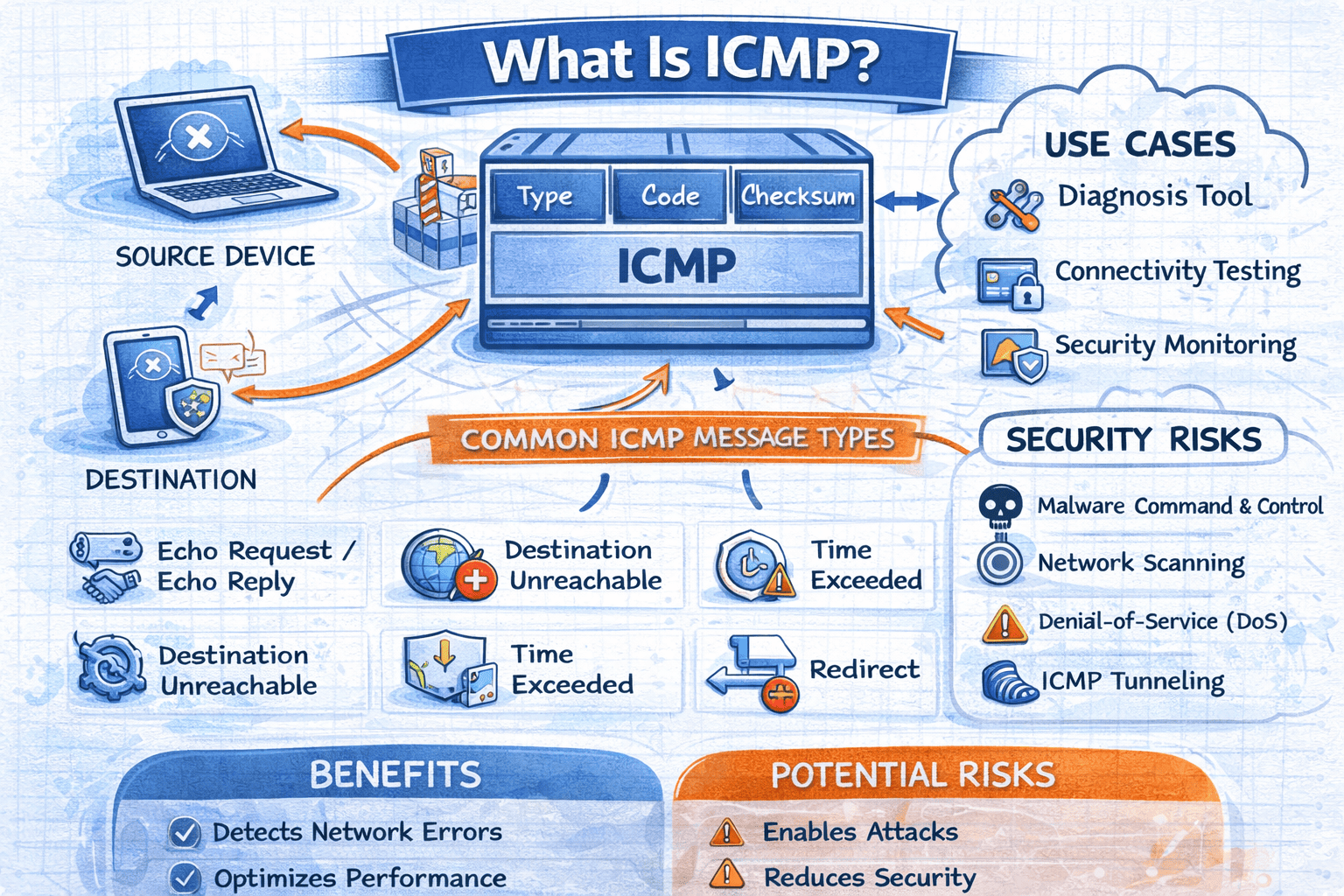
What is ICMP? ICMP stands for Internet Control Message Protocol. It is a core protocol used by network devices to send error messages and operational information about network conditions.
ICMP is not used to transmit data like TCP or UDP. Instead, it acts as a messenger, helping systems communicate issues such as unreachable destinations, packet loss, or routing problems.
ICMP is a critical component of the Internet Protocol (IP) suite and supports reliable network communication.
Why ICMP Is Important in Networking
Understanding what is ICMP helps organizations maintain healthy and efficient networks. Without ICMP, devices would struggle to identify problems or respond to network failures.
ICMP helps networks by:
-
Reporting delivery failures
-
Identifying unreachable hosts or networks
-
Measuring latency and packet loss
-
Supporting network diagnostics
-
Improving overall reliability
For IT managers, ICMP provides valuable insights into network behavior and performance.
How ICMP Works
ICMP works by sending control messages between devices when network events occur. These messages are encapsulated within IP packets and transmitted automatically by routers, servers, and endpoints.
How ICMP Communication Happens:
-
A device sends a packet to a destination
-
If an issue occurs, the receiving device generates an ICMP message
-
The ICMP message is sent back to the source
-
The source interprets the message and adjusts behavior
Understanding what is ICMP also means understanding that it is reactive—it responds to network conditions rather than initiating communication.
Common ICMP Message Types
ICMP includes several message types, each serving a specific purpose. These messages help devices understand what went wrong—or confirm that everything is working as expected.
Most Common ICMP Messages:
-
Echo Request / Echo Reply – Used by ping
-
Destination Unreachable – Indicates delivery failure
-
Time Exceeded – Used by traceroute
-
Redirect – Suggests a better route
-
Parameter Problem – Reports malformed packets
Each message type helps diagnose different network issues.
What Is ICMP Ping?
One of the most familiar uses of ICMP is the ping command. Ping uses ICMP Echo Request and Echo Reply messages to test connectivity between devices.
Ping helps administrators:
-
Confirm device availability
-
Measure network latency
-
Identify packet loss
-
Troubleshoot connectivity issues
When asking what is ICMP, ping is often the first practical example people encounter.
What Is ICMP Traceroute?
Traceroute is another common tool that relies on ICMP. It maps the path packets take across a network by triggering ICMP Time Exceeded messages from intermediate routers.
Traceroute helps:
-
Identify routing issues
-
Pinpoint slow or failing hops
-
Visualize network paths
-
Diagnose ISP or WAN problems
ICMP-based traceroute remains a valuable troubleshooting method for IT teams.
ICMP vs TCP and UDP
Understanding what is ICMP also requires knowing how it differs from other protocols.
| Protocol | Purpose | Data Transfer |
|---|---|---|
| ICMP | Error reporting & diagnostics | No |
| TCP | Reliable data transfer | Yes |
| UDP | Fast, connectionless transfer | Yes |
ICMP supports TCP and UDP by reporting network conditions but does not carry application data itself.
ICMP and Cybersecurity
ICMP is useful—but it can also be abused. Cybercriminals often exploit ICMP for reconnaissance, denial-of-service attacks, and covert communication.
Common ICMP Security Risks:
-
Network scanning and reconnaissance
-
ICMP flood attacks (DoS)
-
ICMP tunneling for data exfiltration
-
Malware command-and-control signaling
For cybersecurity teams, understanding what is ICMP is essential for balancing usability and security.
Should ICMP Be Blocked?
A common question among security teams is whether ICMP should be blocked entirely. The answer is no—but it should be controlled.
Best Practices for ICMP Management:
-
Allow essential ICMP types only
-
Block unnecessary external ICMP traffic
-
Monitor ICMP activity for anomalies
-
Use rate limiting to prevent floods
-
Log ICMP messages for analysis
Blocking ICMP completely can break diagnostics and reduce visibility.
ICMP in Enterprise Networks
In enterprise environments, ICMP plays a vital role in monitoring and troubleshooting complex infrastructures.
ICMP helps enterprises:
-
Monitor network availability
-
Detect routing failures
-
Support SLA validation
-
Identify latency issues
-
Improve incident response
For IT managers, ICMP provides actionable data without impacting performance.
ICMP in Cloud and Hybrid Environments
Cloud adoption has not eliminated the need for ICMP. Cloud providers still rely on ICMP for diagnostics, though some messages may be restricted by default.
Organizations using cloud environments should:
-
Understand provider ICMP policies
-
Enable necessary ICMP traffic
-
Monitor cloud network paths
-
Integrate ICMP into observability tools
Knowing what is ICMP helps teams troubleshoot both on-premise and cloud networks effectively.
ICMP and Firewalls
Firewalls often control ICMP traffic to reduce attack surfaces. However, overly strict rules can cause operational issues.
Firewall ICMP Best Practices:
-
Allow Echo Reply internally
-
Restrict Echo Request from external sources
-
Permit Time Exceeded messages
-
Monitor ICMP logs
-
Align rules with business needs
Balanced ICMP filtering improves security without sacrificing visibility.
How Attackers Exploit ICMP
Despite its usefulness, ICMP can be misused. Understanding attack techniques helps defenders respond effectively.
Common ICMP-Based Attacks:
-
ICMP Floods – Overwhelm targets with traffic
-
Ping Sweeps – Identify live hosts
-
ICMP Tunneling – Bypass security controls
-
Spoofed ICMP Messages – Disrupt routing
Security monitoring tools should flag unusual ICMP patterns.
ICMP Monitoring and Detection
Modern security platforms monitor ICMP traffic as part of network detection and response strategies.
Effective ICMP monitoring includes:
-
Baseline normal ICMP usage
-
Detect abnormal frequency spikes
-
Identify suspicious payloads
-
Correlate ICMP with other events
Understanding what is ICMP enables faster threat detection and response.
Best Practices for Using ICMP Securely
ICMP should be treated as a diagnostic tool—not a free-for-all protocol.
Actionable ICMP Security Tips:
-
Disable unused ICMP message types
-
Use intrusion detection systems (IDS)
-
Apply rate limits
-
Monitor logs continuously
-
Align ICMP policies with Zero Trust principles
These steps reduce risk while preserving operational value.
The Role of ICMP in Zero Trust Security
Zero Trust security models assume no traffic is trusted by default. ICMP still plays a role, but access is tightly controlled.
ICMP in Zero Trust:
-
Supports diagnostics without broad access
-
Enforces least-privilege networking
-
Reduces lateral movement
-
Improves visibility into network behavior
ICMP remains relevant even in modern security architectures.
The Future of ICMP
ICMP continues to evolve alongside networking technologies. While its core purpose remains unchanged, monitoring and control are becoming more sophisticated.
Future trends include:
-
Enhanced ICMP analytics
-
Integration with AI-driven monitoring
-
Improved detection of ICMP-based threats
-
Deeper visibility across hybrid environments
Understanding what is ICMP ensures organizations remain prepared for evolving networks.
Frequently Asked Questions (FAQs)
1. What is ICMP used for?
ICMP is used for error reporting, diagnostics, and network troubleshooting.
2. Is ICMP a security risk?
ICMP can be abused, but when properly managed, it is safe and essential.
3. Should ICMP be disabled?
No. ICMP should be restricted and monitored, not completely disabled.
4. What tools use ICMP?
Ping and traceroute are the most common tools that rely on ICMP.
5. Is ICMP still relevant today?
Yes. ICMP remains critical for network monitoring, diagnostics, and security.
Final Thoughts: ICMP Is Small but Powerful
Understanding what is ICMP reveals just how important this protocol is to network stability and security. While it doesn’t carry user data, it carries insight—helping teams detect problems, optimize performance, and identify threats.
When managed correctly, ICMP strengthens both operational efficiency and cybersecurity posture.
👉 See how advanced security solutions monitor and protect network traffic:
Request a demo: https://www.xcitium.com/request-demo/