What Is an Access Point? A Complete Guide to Wireless Networking
Updated on January 5, 2026, by Xcitium
Wireless connectivity is no longer a luxury—it’s a business necessity. From offices and hospitals to warehouses and campuses, organizations rely on seamless Wi-Fi to stay productive and competitive. This often leads to a fundamental networking question: what is an access point, and how does it work?
An access point plays a central role in modern networks by connecting wireless devices to a wired network. For IT managers and cybersecurity teams, understanding what is an access point is essential for designing secure, scalable, and high-performance wireless environments. In this guide, we’ll explain access points in simple terms, explore how they work, their types, security considerations, and best practices for enterprise use.
What Is an Access Point?
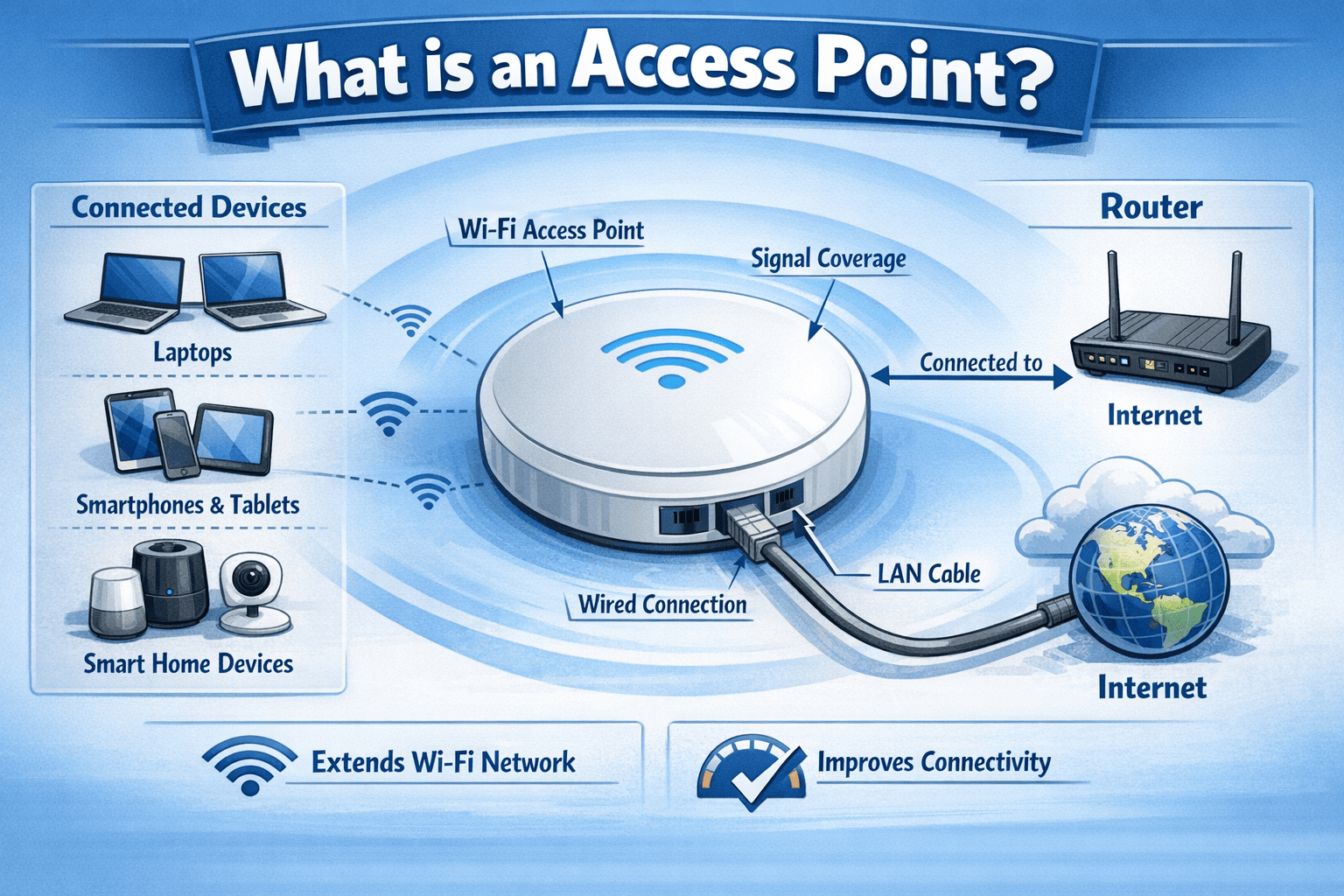
An access point (AP) is a networking device that allows wireless devices—such as laptops, smartphones, and IoT devices—to connect to a wired local area network (LAN). It acts as a bridge between wireless clients and the wired network infrastructure.
In simple terms, when you ask what is an access point, the answer is:
A device that creates a Wi-Fi network and connects wireless users to the main network.
Access points are commonly used in homes, offices, schools, hospitals, and public spaces to extend wireless coverage and support multiple devices simultaneously.
Why Access Points Are Important in Modern Networks
As the number of connected devices grows, relying on a single router is no longer sufficient.
Access points are important because they:
-
Extend wireless coverage
-
Support high device density
-
Improve network performance
-
Enable centralized management
-
Enhance network security
For businesses, access points ensure reliable connectivity across large spaces without sacrificing speed or stability.
How an Access Point Works
To fully understand what is an access point, it helps to look at how it operates within a network.
Basic Operation
-
The access point connects to a wired network via Ethernet
-
It broadcasts a wireless signal (SSID)
-
Wireless devices connect to the AP
-
The AP forwards traffic between devices and the wired network
This process happens transparently, allowing users to move freely while staying connected.
Access Point vs Router: What’s the Difference?
Many people confuse routers and access points.
| Feature | Access Point | Router |
|---|---|---|
| Primary role | Wireless connectivity | Network routing |
| DHCP/NAT | No | Yes |
| Coverage | Extends Wi-Fi | Limited range |
| Best use | Medium to large networks | Home or small offices |
A router connects networks together, while an access point focuses on wireless access.
Types of Access Points
Understanding what is an access point also means knowing the different types available.
1. Standalone Access Points
Standalone access points are configured individually.
Best for:
-
Small offices
-
Limited deployments
-
Simple network needs
They offer basic functionality but limited scalability.
2. Controller-Based Access Points
These APs are managed centrally by a wireless controller.
Benefits include:
-
Centralized configuration
-
Seamless roaming
-
Consistent security policies
-
Enterprise scalability
They are common in large organizations and campuses.
3. Cloud-Managed Access Points
Cloud-managed access points are controlled through a cloud dashboard.
Advantages:
-
Remote management
-
Automatic updates
-
Scalable deployments
-
Reduced on-prem complexity
This model is popular in modern, distributed environments.
4. Mesh Access Points
Mesh access points connect wirelessly to each other instead of using Ethernet for every AP.
Use cases include:
-
Large open spaces
-
Warehouses
-
Temporary deployments
Mesh networks simplify installation but may impact performance.
Key Benefits of Using Access Points
Organizations deploy access points to achieve specific benefits.
Major Benefits
-
Broader Wi-Fi coverage
-
Higher network reliability
-
Support for many devices
-
Better performance than routers alone
-
Centralized control and monitoring
For growing businesses, access points are essential to maintaining network quality.
What Is an Access Point in Enterprise Networks?
In enterprise environments, access points are part of a larger wireless infrastructure.
Enterprise Use Cases
-
Corporate offices
-
Healthcare facilities
-
Retail stores
-
Manufacturing plants
-
Educational campuses
Enterprise access points support advanced features such as load balancing, roaming, and enhanced security.
Access Points and Wireless Standards
Access points support different Wi-Fi standards that impact performance.
Common Standards
-
Wi-Fi 4 (802.11n)
-
Wi-Fi 5 (802.11ac)
-
Wi-Fi 6 (802.11ax)
-
Wi-Fi 6E
Newer standards provide faster speeds, lower latency, and better handling of dense environments.
Access Point Placement Best Practices
Proper placement is critical for performance.
Placement Tips
-
Avoid physical obstructions
-
Distribute APs evenly
-
Place APs on ceilings when possible
-
Avoid overlapping channels
-
Perform site surveys
Poor placement can degrade even the best access point hardware.
Access Point Security Considerations
From a cybersecurity perspective, understanding what is an access point also means understanding its risks.
Common Security Risks
-
Unauthorized access
-
Rogue access points
-
Weak encryption
-
Poor authentication
-
Misconfigured networks
Wireless networks are attractive targets for attackers.
Best Practices for Securing Access Points
To reduce risk, organizations should follow wireless security best practices.
Security Best Practices
-
Use WPA3 encryption
-
Enforce strong authentication
-
Segment guest networks
-
Disable unused SSIDs
-
Monitor for rogue APs
-
Keep firmware updated
Security should be designed into the wireless network from day one.
Access Points and Network Segmentation
Access points support network segmentation through VLANs.
Why Segmentation Matters
-
Isolates sensitive systems
-
Limits lateral movement
-
Protects guest users
-
Improves compliance
Segmentation enhances security without sacrificing usability.
Access Points vs Extenders vs Repeaters
Another common question related to what is an access point is how it differs from extenders.
| Device | Function | Performance |
|---|---|---|
| Access Point | Creates new Wi-Fi cell | High |
| Extender | Repeats signal | Medium |
| Repeater | Amplifies signal | Low |
Access points provide the best performance and scalability.
Access Points in Cloud and Hybrid Networks
Modern networks often span on-prem and cloud environments.
Access points integrate with:
-
Cloud identity providers
-
Zero Trust frameworks
-
Network monitoring tools
-
Security analytics platforms
This integration supports modern security and management models.
Access Points and Zero Trust Security
Zero Trust assumes no user or device is trusted by default.
Access points support Zero Trust by:
-
Enforcing authentication
-
Integrating with identity systems
-
Applying access policies
-
Monitoring device behavior
Wireless access becomes a controlled entry point, not an open gateway.
Common Access Point Deployment Mistakes
Even experienced teams make mistakes.
Common Pitfalls
-
Underestimating device density
-
Poor placement
-
Weak security settings
-
Ignoring firmware updates
-
Lack of monitoring
Avoiding these mistakes improves performance and security.
Monitoring and Managing Access Points
Visibility is essential for reliable wireless networks.
Key Metrics to Monitor
-
Signal strength
-
Client load
-
Bandwidth usage
-
Error rates
-
Security events
Centralized monitoring helps IT teams respond quickly to issues.
Performance Impact of Access Points
Access points impact overall network performance.
Performance Factors
-
Hardware capabilities
-
Wi-Fi standards
-
Channel planning
-
Client density
-
Backhaul capacity
Enterprise-grade APs are designed for high throughput and reliability.
The Future of Access Points
Wireless networking continues to evolve.
Emerging Trends
-
Wi-Fi 7
-
AI-driven optimization
-
Cloud-native management
-
Enhanced IoT support
-
Deeper security integration
Understanding what is an access point will remain essential as wireless demands grow.
Frequently Asked Questions (FAQs)
1. What is an access point used for?
An access point allows wireless devices to connect to a wired network.
2. Is an access point the same as a router?
No. A router directs traffic between networks, while an access point provides Wi-Fi access.
3. How many access points does a business need?
It depends on space size, layout, and device density.
4. Are access points secure?
Yes, when properly configured with strong encryption and authentication.
5. Do access points work with cloud security models?
Yes. Modern access points integrate with cloud and Zero Trust security platforms.
Final Thoughts: Why Understanding What Is an Access Point Matters
Wireless connectivity underpins modern business operations. Understanding what is an access point empowers organizations to design networks that are fast, scalable, and secure. From productivity to cybersecurity, access points play a critical role in delivering reliable digital experiences.
For IT managers and executives, investing in the right access point strategy is not just a technical decision—it’s a business one.
Secure Wireless Access with Confidence
Access points open the door to your network. Securing that door requires real-time visibility, Zero Trust enforcement, and proactive threat detection.
👉 See how Xcitium helps protect wireless and enterprise networks
Request a Demo