What Is a Router? A Complete Guide for IT Leaders and Cybersecurity Experts
Updated on July 29, 2025, by Xcitium
In today’s hyper-connected world, where every device—your phone, laptop, smart fridge—is online, knowing what a router is and how it functions is more crucial than ever. Despite being a foundational part of network infrastructure, many IT managers, CEOs, and even cybersecurity experts overlook the role of routers in network security.
So, what is a router, really? It’s not just a box blinking in a corner—it’s the gatekeeper between your private network and the outside internet. Let’s dive deep into how routers operate, their types, security risks, and why they’re vital to online protection.
What Is a Router?
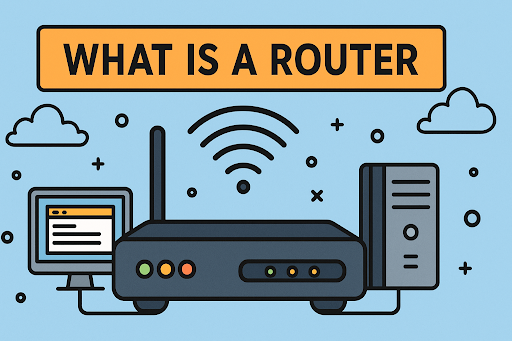
A router is a networking device that forwards data packets between computer networks. In simple terms, it connects your devices to the internet and manages traffic so data reaches the correct destination.
Whether in a corporate data center or your home office, routers ensure that digital information like emails, video streams, or software updates get from Point A to Point B securely and efficiently.
Modern routers also come with built-in firewalls, encryption, and traffic filtering capabilities, making them a first line of defense in cybersecurity.
How Does a Router Work?
Routers work by using IP addresses to determine where data should go. They analyze incoming data packets and decide the best path for that data to reach its destination.
Here’s a step-by-step breakdown:
- Receives Data: The router gets data from a device (like your laptop).
- Examines Headers: It checks the IP address and destination.
- Forwards Packets: It routes the packets through the best network path.
- Manages Traffic: Prevents congestion by balancing loads.
- Implements Security: Applies filtering, NAT, and encryption.
Fun Fact:
Most home users have a wireless router that combines the functions of a router and an access point, making it easy to connect multiple devices to Wi-Fi.
Types of Routers and Their Use Cases
1. Core Routers
Used by large enterprises and ISPs, these route data within a major network backbone.
2. Edge Routers
Located at the boundary of networks, they handle data entering or exiting a system.
3. Wireless Routers
Common in homes and small businesses, these route data and provide wireless connectivity.
4. Virtual Routers
Software-based solutions that run on cloud infrastructure, ideal for scalable, virtualized environments.
Router vs. Modem: What’s the Difference?
| Feature | Router | Modem |
| Role | Connects devices in a network | Connects the network to the internet |
| Functionality | Routes data to devices | Converts digital data for ISP signals |
| Security | Offers firewall, VPN, MAC filtering | Generally minimal |
Pro Tip: In many setups, routers and modems are combined into a single device, but understanding the difference helps in network optimization and troubleshooting.
Why Routers Are Critical for Cybersecurity
🔐 Network Access Control
Routers manage who can access your network and limit exposure to threats.
🛡️ Built-in Firewalls
Many routers include firewall features that inspect incoming traffic and block suspicious activity.
🌍 VPN Integration
Some advanced routers support VPN connections, encrypting your traffic for remote workers.
🧠 Traffic Monitoring
Routers can log and monitor network traffic, which is essential for detecting anomalies or breaches.
Common Router Security Vulnerabilities
Despite their importance, routers are often overlooked in security protocols. Here are some common risks:
- Default login credentials still in use
- Outdated firmware with known exploits
- Weak Wi-Fi passwords
- Disabled firewall settings
- No guest network isolation
Best Practices to Secure Your Router
Want to enhance your router’s protection? Follow these actionable tips:
✔️ Change Default Passwords
Use strong, unique login credentials for both admin and Wi-Fi access.
✔️ Enable WPA3 Encryption
If supported, WPA3 provides better wireless encryption than WPA2 or WEP.
✔️ Regular Firmware Updates
Ensure your router is patched with the latest security updates.
✔️ Disable Remote Management
Unless needed, turn off access to router settings from outside your network.
✔️ Use Guest Networks
Keep visitors or IoT devices on separate VLANs for added security.
The Future of Routers: AI and Automation
With the rise of AI in cybersecurity, future routers will do more than just route traffic. Expect features like:
- AI-driven threat detection
- Dynamic QoS adjustments
- Auto-updating firmware
- Self-healing network paths
These improvements will make routers smarter, faster, and more secure—ideal for businesses with growing data needs.
Real-World Use Case: Business Router Saves the Day
A mid-sized finance company suffered slow internet and unusual data logs. Their IT team discovered that their router was compromised through an unpatched firmware vulnerability.
After replacing it with an enterprise-grade, secure router and updating all credentials, not only did internet speed improve, but the company also averted a major data breach.
Is your business router secure and optimized?
Don’t leave your network vulnerable.
👉 Request a free cybersecurity demo with Xcitium
Frequently Asked Questions (FAQs)
1. What is a router in networking?
A router is a device that connects different networks and directs data between them based on IP addresses.
2. Can a router be hacked?
Yes. If left unsecured—through weak passwords or outdated firmware—routers can be exploited by hackers.
3. Is a modem the same as a router?
No. A modem connects your network to the internet, while a router distributes that connection to your devices.
4. What kind of router do I need for a small business?
Look for routers with advanced firewall capabilities, VPN support, and scalability for growing teams.
5. Do routers affect internet speed?
Yes. The quality, settings, and health of your router can impact network performance and speed.
Conclusion
Understanding what a router is and how it fits into your overall cybersecurity strategy is crucial for any organization. From managing traffic to acting as the first line of defense, routers are the unsung heroes of digital security.
Whether you’re a tech-savvy IT manager or a CEO looking to harden your company’s infrastructure, knowing how routers work—and how to secure them—is a step toward a resilient and protected digital future.
👉 Ready to strengthen your network’s defenses?
Request a free demo with Xcitium now