Have you ever wondered where your photos, emails, or business files actually live once you hit “upload”? If you’ve asked yourself what is cloud in cloud computing, you’re not alone — millions of people use cloud services every single day without knowing what happens behind the screen. In simple terms, the “cloud” refers to a global network of remote servers that store, manage, and process data over the internet instead of on your local computer or hard drive. Understanding what is cloud in cloud computing is the first step toward using the internet more securely, since every file you store online passes through someone else’s infrastructure. In this guide, we’ll break down how cloud computing works, its main types, its benefits, and — most importantly — how to keep your data safe from cyber threats while using it.
What is Cloud in Cloud Computing? (The Simple Definition)
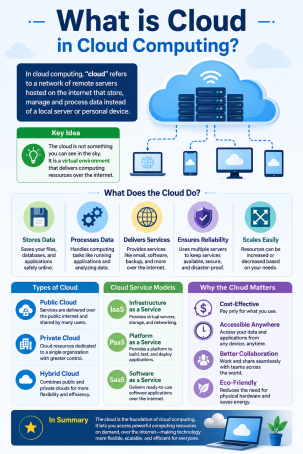
To understand what is cloud in cloud computing, picture a massive network of powerful, interconnected remote servers housed in secure data centers around the world. Instead of storing files or running applications on a single physical device, cloud computing allows you to access computing resources — storage, processing power, software, and networking — over the internet, on demand.
The word “cloud” is simply a metaphor for the internet itself. When engineers first drew network diagrams, they used a cloud symbol to represent the internet because its exact infrastructure was too complex to map out in detail. That symbolism stuck, and today the term describes any service delivered through remote servers rather than local hardware.
So when someone asks what is cloud in cloud computing, the short answer is this: it’s the invisible layer of internet-connected servers that lets you store data, run software, and access files from anywhere, on any device, without needing to manage physical hardware yourself.
How Does Cloud Computing Work?
Cloud computing works through a technology called virtualization, which allows a single physical server to be divided into multiple virtual machines. Each virtual machine can run its own operating system and applications independently, allowing cloud providers to serve thousands of users from the same physical hardware efficiently.
Cloud Infrastructure Explained
Behind every cloud service is a layer of physical infrastructure — servers, storage drives, networking equipment, and cooling systems housed in massive data centers. Cloud providers like Amazon Web Services, Microsoft Azure, and Google Cloud manage this infrastructure so businesses and individuals don’t have to invest in their own hardware. When you upload a file or open a cloud-based app, your request travels through the internet to one of these data centers, where the actual processing or storage takes place, and the result is sent back to your screen in seconds.
This on-demand model is what makes cloud computing so scalable — resources can expand or shrink automatically based on how much you actually need, which also means your exposure to cyber threats can change just as quickly if security isn’t managed properly.
Types of Cloud Deployment Models
Not all clouds are built the same way. The three main cloud deployment models determine who owns, manages, and can access the infrastructure.
Public Cloud
A public cloud is owned and operated by a third-party provider and shared across multiple organizations or individuals over the public internet. It’s cost-effective and scalable, but because resources are shared, strong access controls and encryption are essential for protecting sensitive data.
Private Cloud
A private cloud is dedicated to a single organization, either hosted on-site or by a third-party provider. It offers greater control over data storage, internet security, and compliance, making it a popular choice for industries handling sensitive information, such as finance and healthcare.
Hybrid Cloud
A hybrid cloud combines public and private cloud environments, allowing data and applications to move between them. This flexibility helps businesses balance cost efficiency with tighter control over critical systems, though it also introduces more complex security requirements across multiple environments.
Cloud Service Models: IaaS, PaaS, and SaaS
Beyond deployment models, cloud computing services are also categorized by what they deliver:
- Infrastructure as a Service (IaaS): Provides virtualized computing resources like servers and storage over the internet, giving businesses full control over their operating systems and applications.
- Platform as a Service (PaaS): Offers a ready-made environment for developers to build, test, and deploy applications without managing the underlying infrastructure.
- Software as a Service (SaaS): Delivers fully functional software applications over the internet, such as email or file-sharing tools, accessible directly through a web browser.
Each model shifts a different level of responsibility — and cybersecurity risk — between the cloud provider and the end user.
Key Benefits of Cloud Computing
Understanding what is cloud in cloud computing also means recognizing why so many businesses and individuals have moved away from traditional, on-premise systems:
- Cost savings — no need to buy or maintain physical servers.
- Scalability — resources adjust automatically based on demand.
- Accessibility — data and applications are available from anywhere with an internet connection.
- Automatic updates — providers handle software patches and maintenance.
- Disaster recovery — data is backed up across multiple locations, reducing the risk of permanent loss.
Cloud Security Risks Every User Should Know
While cloud computing offers convenience, it also introduces unique cybersecurity challenges. Because your data lives on remote servers accessed over the internet, it becomes a target for cybercriminals looking to exploit weak passwords, unpatched software, or misconfigured storage settings. Common cloud security risks include:
- Data breaches caused by weak access controls or stolen credentials.
- Misconfigured cloud storage that leaves files publicly accessible by mistake.
- Insecure APIs that attackers can exploit to gain unauthorized access.
- Insider threats from employees or third parties with excessive permissions.
- Account hijacking through phishing attacks targeting cloud login credentials.
This is exactly why online security and cloud security go hand in hand — the more you rely on the cloud, the more important it becomes to protect the accounts and devices connecting to it.
Actionable Tips to Secure Your Cloud Environment
Whether you’re an individual user or managing cloud infrastructure for a business, these practical steps can significantly reduce your risk:
- Enable multi-factor authentication (MFA) on every cloud account to prevent unauthorized logins even if a password is compromised.
- Encrypt sensitive data both at rest and in transit so it remains unreadable if intercepted.
- Review access permissions regularly and remove unused accounts or excessive privileges.
- Use a trusted endpoint security solution to monitor devices connecting to your cloud environment for malware or suspicious activity.
- Back up critical data across multiple locations to protect against accidental deletion or ransomware.
- Stay alert to phishing attempts, since stolen credentials remain one of the most common ways attackers breach cloud accounts.
Taking these steps doesn’t just protect your files — it protects your entire digital identity from the growing range of cyber threats targeting cloud users today.
Frequently Asked Questions (FAQs)
1. What is cloud in cloud computing, in one sentence?
Cloud in cloud computing refers to the network of remote, internet-connected servers used to store data and run applications, instead of relying on a local computer or physical hardware.
2. Is cloud computing safe from hackers?
Cloud computing can be safe when proper security measures — like encryption, multi-factor authentication, and strong access controls — are in place. However, no system is completely risk-free, which is why ongoing cybersecurity practices are essential.
3. What’s the difference between public, private, and hybrid cloud?
Public cloud is shared among multiple users on provider-owned infrastructure, private cloud is dedicated to a single organization, and hybrid cloud combines both for flexibility and control.
4. Do I need cybersecurity software if I use cloud storage?
Yes. Cloud providers secure their infrastructure, but you’re still responsible for securing your devices, passwords, and access points — this is often called the “shared responsibility model.”
5. What industries benefit most from cloud computing?
Nearly every industry benefits, but healthcare, finance, retail, and remote-first businesses see especially strong advantages due to cloud computing’s scalability, accessibility, and cost efficiency.
Protect Your Cloud Environment Today
Now that you understand what is cloud in cloud computing and the risks that come with it, the next step is making sure your data — and your business — stay protected. Cyber threats targeting cloud environments are evolving every day, and the right security solution can make all the difference.
Ready to strengthen your cloud security posture?
Request a free demo with Xcitium today and see how proactive protection can keep your data safe in the cloud.
Please give us a star rating based on your experience.


 (24 votes, average: 2.42 out of 5, rated)


