The Mitre ATT&CK Framework is a platform providing knowledge on tracking cyber adversary tactics and techniques. It gives curated insights into the threats they use across the entire attack lifecycle. This framework works more than a collection of data, and to analyze this data, you need to use a Mitre ATTACK navigator tool.
The MITRE ATT&CK Navigator is a powerful tool for organizing, visualizing and analyzing information that is related to MITRE ATT&CK Framework. This tool can significantly help many blue teams using MITRE ATTACK Navigator for their detection and response technique. Progressing defenders can use the framework resources to understand attacks and the rules and methods for detection. The navigator tool simplifies those methods in an interactive way.
MITRE created ATT&CK for documenting attack techniques that are used in adversary emulations. This common knowledge base documents tactics and techniques, reflecting real adversary behaviors. Hence, every defender should have an awareness of each tactic and technique. You can start by diving into each technique listed in the ATT&CK Matrix from left to right for self-progression. An easier way to work on them is via using the MITRE ATTACK Navigator tool.
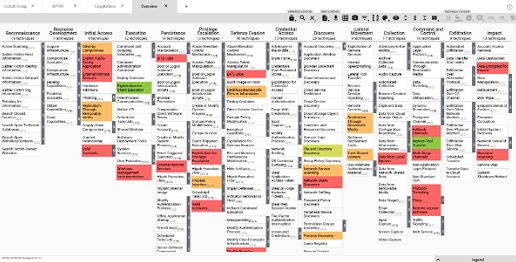
The tool can download the Matrix of MITRE ATT&CK Framework to an Excel file. The MITRE DEFEND navigator works as an extracting tool to extract D3FEND techniques from the raw text to map them automatically to ATT&CK. Blue teams can install this tool to explore and understand the relationships between defensive tactics and techniques. MITRE DEFEND navigator knowledge base would offer you a graphical interface.
It displays the relationships between different defensive techniques and threats designed to protect against detection. By exploring these techniques, a blue team can create custom maps of defensive strategies. The MITRE DEFEND navigator is designed for cybersecurity professionals, security analysts and other professionals who want to understand and improve their organization’s defensive posture. But all these are possible due to sourcing knowledge from MITRE ATT&CK Framework Here are some benefits you get from Xcitium EDR.,
A Step-By-Step Method To Use MITRE ATTACK Navigator
You can use the MITRE ATTACK Navigator tool to identify gaps in an organization’s network security measures. The MITRE ATTACK Navigator can be used in a variety of scenarios. Some of them include adversary emulation, threat intelligence, incident response, and security assessments. In order to know how to use the tool, you need to install MITRE ATTACK-Navigator first. Now follow the below step-by-step method for using MITRE ATTACK Navigator in your security assessment:
- Choose An Attack Scenario
- Select A Technique Or Tactic
- Analyze The Technique
Start with choosing a scenario use case for the navigator. The scenario could be an emulation exercise, an incident response investigation, or it could be a threat intelligence analysis.
Once you have decided on a scenario, use the MITRE ATTACK Navigator tool to select a specific tactic or technique from the MITRE ATT&CK Framework. For instance, if you are conducting an adversary emulation exercise, choose a tactic like “Initial Access” and then select a technique for “Phishing.”
Once you have selected a technique, explore it in detail using MITRE ATTACK Navigator. The Technique layer on the MITRE ATTACK Navigator tool would include information on the techniques, including descriptions, examples of real-world usage, and relevant mitigations. The layer on MITRE ATTACK Navigator may also include information on related tactics and techniques along with any relevant data sources and detection methods.
What Are The Different Layers Used In MITRE ATTACK Navigator?
In the MITRE ATTACK Navigator tool, layers are there for users to visualize organized information related to the MITRE ATTACK Framework. MITRE ATTACK Navigator tool layers offer customizable views of the navigator, so users can focus on specific aspects of the framework. Here are some ways the MITRE ATTACK Navigator tool can use layers:
- Tactic and techniques layers
- Threat actor layers
- Importing layers
- Custom Layers
Whether it’s cybersecurity teams or threat hunters, the MITRE ATTACK Navigator tool can be valuable for anyone to protect from attacks. Its comprehensive and flexible framework can help organizations improve their security posture and better defend against cyber threats. Get in contact with Xcitium to create and import custom layers for your MITRE ATTACK Navigator tool. This would enable you to focus on specific aspects of the framework that are most relevant to your needs.
