What Is the OSI Model? The Complete 7-Layer Networking Model Explained for IT & Cybersecurity Professionals
Updated on December 1, 2025, by Xcitium
If you’re searching for what is the OSI model, you’re probably trying to understand one of the most important frameworks in networking and cybersecurity. The OSI model (Open Systems Interconnection) is a conceptual model that explains how data moves from one device to another across a network. Even though it’s not used directly by most modern protocols, it remains the foundation of network engineering, troubleshooting, cybersecurity analysis, and IT architecture.
Whether you’re an IT manager, cybersecurity specialist, SOC analyst, CTO, or CEO, understanding the OSI model—and the role each layer plays—helps you diagnose issues faster, design secure architectures, and communicate more clearly with your technical teams.
In this guide, you’ll learn what the OSI model is, how the 7 layers work, real-world examples, security risks at each layer, and how professionals use the model in daily operations.
What Is the OSI Model? (Simple Definition)
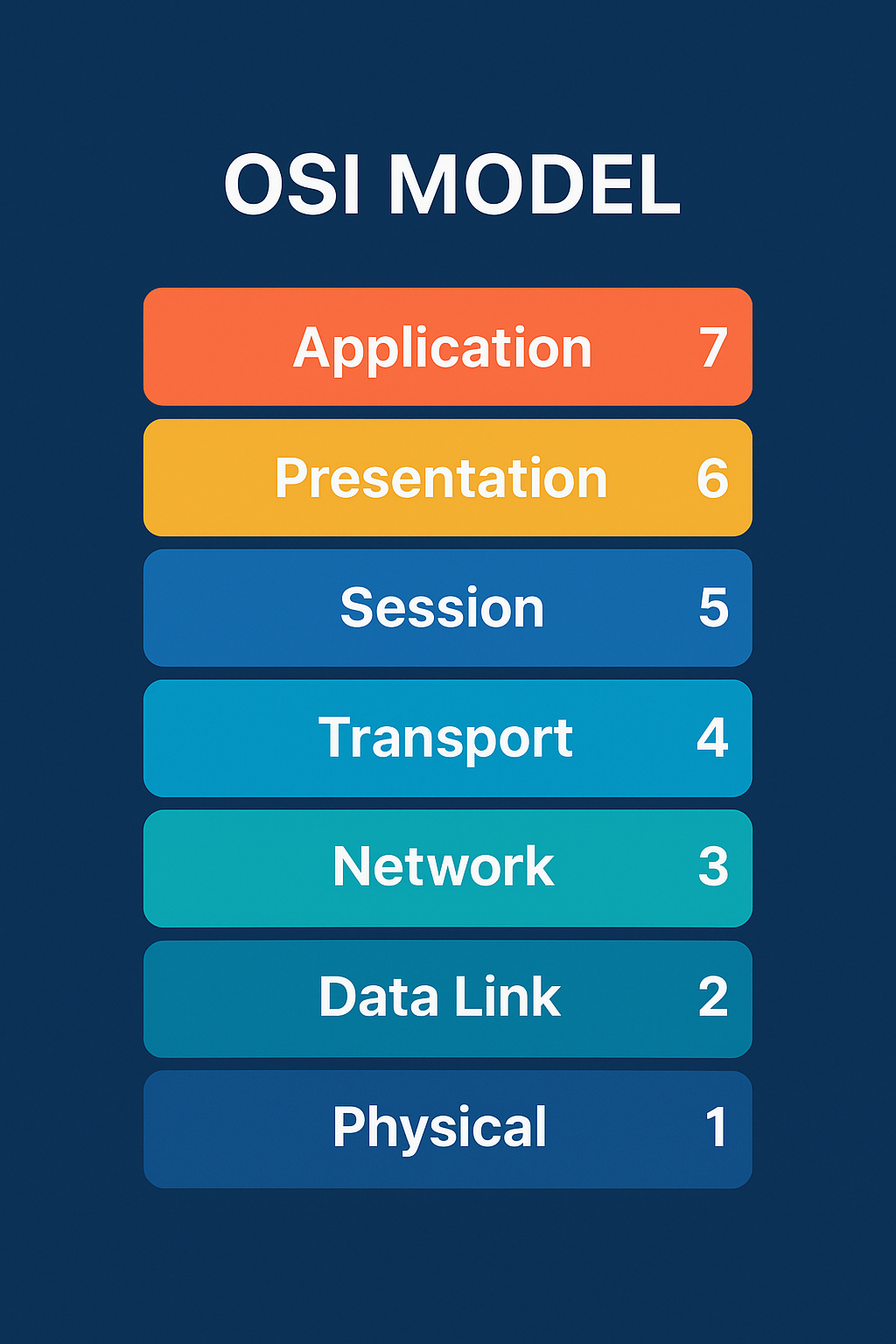
The OSI Model is a 7-layer framework created by the International Organization for Standardization (ISO) to describe how data is transmitted, processed, and received across a network.
It organizes communication into seven layers:
-
Physical
-
Data Link
-
Network
-
Transport
-
Session
-
Presentation
-
Application
Each layer has a specific role, interacts with the layer above and below it, and helps devices communicate efficiently.
Think of the OSI model like a delivery system:
-
Trucks = Physical
-
Sorting centers = Data Link
-
Delivery routes = Network
-
Shipping reliability = Transport
-
Packaging = Presentation
-
Customer interaction = Application
Understanding what is the OSI helps IT teams diagnose where problems occur—even in modern TCP/IP networks.
Why the OSI Model Still Matters in 2026
Even though today’s networks rely heavily on the TCP/IP model, the OSI model remains essential because:
✔ It teaches how networks truly work
✔ It helps troubleshoot issues systematically
✔ It identifies where cybersecurity risks occur
✔ It improves communication across IT and engineering teams
✔ It creates a universal language between vendors
For cybersecurity professionals, the OSI model highlights attack surfaces and helps analyze threats by “layer.”
The 7 Layers of the OSI Model (Explained Clearly)
Below, each layer is explained in simple and professional terms, including real-world examples and security concerns.
1. Physical Layer (Layer 1)
Function: Moves raw bits (0s and 1s) through physical media.
Examples
-
Ethernet cables (Cat5, Cat6)
-
Fiber optic cables
-
Wi-Fi radio signals
-
Hubs, repeaters, physical ports
Cybersecurity Risks
-
Wiretapping
-
Signal jamming
-
Physical tampering
-
Rogue devices plugged into ports
How IT Uses This Layer
-
Checking cable issues
-
Diagnosing hardware failures
-
Verifying link lights
2. Data Link Layer (Layer 2)
Function: Handles MAC addressing and local network communication.
Examples
-
Switches
-
MAC addresses
-
VLANs
-
ARP
Cybersecurity Risks
-
MAC spoofing
-
ARP poisoning
-
VLAN hopping
How IT Uses This Layer
-
Managing switches
-
Configuring VLANs
-
Troubleshooting ARP issues
3. Network Layer (Layer 3)
Function: Handles IP addressing and routing packets between networks.
Examples
-
Routers
-
IPv4 and IPv6
-
Routing protocols (OSPF, BGP, EIGRP)
Cybersecurity Risks
-
IP spoofing
-
Routing table poisoning
-
DDoS attacks
How IT Uses This Layer
-
Diagnosing routing issues
-
Subnetting
-
Managing firewalls
4. Transport Layer (Layer 4)
Function: Ensures reliable or unreliable delivery of data.
Key Protocols
-
TCP (reliable)
-
UDP (fast, unreliable)
Cybersecurity Risks
-
SYN flooding
-
Port scanning
-
Session hijacking
How IT Uses This Layer
-
Reviewing ports for troubleshooting
-
Firewalls (Layer 4 rules)
-
Service-to-service communication
5. Session Layer (Layer 5)
Function: Manages sessions between applications (open, maintain, close).
Examples
-
APIs
-
NetBIOS
-
RPC
Cybersecurity Risks
-
Unauthorized session takeover
-
Session replay attacks
How IT Uses This Layer
-
Application troubleshooting
-
API communication analysis
6. Presentation Layer (Layer 6)
Function: Translates data so applications can understand each other.
Examples
-
Encryption (SSL/TLS)
-
Data compression
-
Character encoding (ASCII, UTF-8)
Cybersecurity Risks
-
SSL stripping
-
Certificate attacks
-
Misconfigured encryption
How IT Uses This Layer
-
Debugging SSL issues
-
Certificate deployments
7. Application Layer (Layer 7)
Function: Interface for users and applications to communicate over networks.
Examples
-
HTTP / HTTPS
-
DNS
-
SMTP
-
SNMP
-
File transfer apps
Cybersecurity Risks
-
SQL injection
-
Cross-site scripting (XSS)
-
Malware downloads
-
Phishing
-
API attacks
How IT Uses This Layer
-
Web troubleshooting
-
Log analysis
-
Application performance monitoring
Easy Way to Remember the OSI Layers
Mnemonic (from Layer 7 to 1):
👉 All People Seem To Need Data Processing
Reverse (Layer 1 to 7):
👉 Please Do Not Throw Sausage Pizza Away
OSI Model vs. TCP/IP Model (Clear Comparison)
| Feature | OSI Model | TCP/IP Model |
|---|---|---|
| Layers | 7 | 4 |
| Use Case | Theory, teaching, troubleshooting | Real-world networking |
| Includes | Presentation, Session layers | Merged into Application |
| Security Mapping | Very detailed | Less granular |
Professionals use OSI for analysis, TCP/IP for implementation.
How Cybersecurity Teams Use the OSI Model
Understanding what is the OSI model is vital in modern security operations.
Security Teams Use OSI To:
-
Identify attack points
-
Map vulnerabilities by layer
-
Build layered defenses (defense-in-depth)
-
Analyze traffic logs
-
Explain issues to non-technical executives
Layered Attack Examples
-
Layer 1: Cable tapping
-
Layer 3: IP spoofing
-
Layer 4: Port scans
-
Layer 7: Web app attacks
OSI model helps unify risk discussions across IT and security teams.
Common OSI-Based Troubleshooting Scenarios
Here’s how professionals diagnose network issues using the OSI model.
Scenario 1: “My internet is down.”
-
Layer 1 → Cable unplugged
-
Layer 2 → Switch port disabled
-
Layer 3 → Wrong IP configuration
-
Layer 4 → Firewall blocking TCP
-
Layer 7 → Browser issues
Scenario 2: “VPN won’t connect.”
-
Layer 3 → Routing problems
-
Layer 4 → Port blocked
-
Layer 5 → Session timeout
-
Layer 6 → Certificate mismatch
Scenario 3: “Website won’t load.”
-
Layer 3 → DNS resolution
-
Layer 4 → TCP handshake failure
-
Layer 7 → Application errors
The OSI model guides a structured troubleshooting workflow.
Benefits of Understanding the OSI Model for IT Managers & Leaders
✔ Improves communication across teams
✔ Allows faster diagnostic reasoning
✔ Simplifies training for new technicians
✔ Strengthens network design
✔ Helps align cybersecurity strategies
✔ Enhances vendor discussions
Even executives benefit from understanding the OSI model during risk assessments.
FAQs: What Is the OSI Model?
1. Is the OSI model still used today?
Yes. While modern networks use TCP/IP, the OSI model is essential for troubleshooting and security analysis.
2. Why does the OSI model have 7 layers?
To break networking tasks into manageable segments and standardize communication.
3. Which OSI layer is most important?
All layers are important; however, Layers 3, 4, and 7 are the most commonly analyzed in security and troubleshooting.
4. Does the OSI model apply to cloud computing?
Yes — cloud networking still relies on OSI concepts like routing, encryption, and applications.
5. What is the easiest way to learn the OSI model?
Use mnemonics, study real-world examples, and practice troubleshooting by layer.
Final Thoughts
Understanding what is the OSI model gives you a powerful advantage in networking, cybersecurity, and IT management. The 7-layer model helps professionals pinpoint issues quickly, strengthen their infrastructure, improve collaboration, and build a more secure and efficient network architecture.
Whether you’re designing enterprise networks, securing cloud environments, or troubleshooting everyday connectivity problems, the OSI model remains one of the most valuable frameworks you can master.
🚀 Strengthen Your Network Security With Xcitium
👉 Request a Demo: https://www.xcitium.com/request-demo/