How to Delete Voicemail Box: A Complete Guide for Security and IT Leaders
Updated on December 29, 2025, by Xcitium
Have you ever wondered whether old voicemail boxes pose a security risk? Many organizations overlook voicemail systems, yet they often store sensitive messages, contact details, and authentication clues. Knowing how to delete voicemail box properly is more than a convenience—it’s a security best practice.
In this guide, we’ll explain how to delete voicemail box across mobile devices, VoIP platforms, and enterprise phone systems. We’ll also explore why voicemail management matters for cybersecurity, compliance, and operational efficiency.
Whether you’re an IT manager, cybersecurity professional, or CEO, this article will help you eliminate unnecessary risk while keeping communication systems clean and secure.
Why Deleting a Voicemail Box Matters
Before diving into how to delete voicemail box, it’s important to understand why this task matters—especially in business environments.
Voicemail systems often contain:
-
Personally identifiable information (PII)
-
Client names and phone numbers
-
Internal business discussions
-
Password reset or verification messages
If left unmanaged, voicemail boxes can become silent security liabilities.
Security Risks of Unmanaged Voicemail Boxes
1. Unauthorized Access
Weak PINs or default passwords make voicemail boxes easy targets for attackers.
2. Social Engineering Attacks
Hackers can gather intelligence from voicemail greetings and stored messages.
3. Compliance Violations
Industries like healthcare and finance must protect stored communications under regulations such as HIPAA or GDPR.
This is why knowing how to delete voicemail box safely is critical for risk reduction.
How to Delete Voicemail Box on Mobile Devices
Mobile voicemail is one of the most common areas where unused voicemail boxes accumulate.
How to Delete Voicemail Box on iPhone
-
Open the Phone app
-
Tap Voicemail
-
Select messages and tap Delete
-
To permanently remove them, go to Deleted Messages and clear them
Note: iPhones do not allow full voicemail box removal, but clearing messages significantly reduces exposure.
How to Delete Voicemail Box on Android
-
Open the Phone app
-
Press and hold the voicemail message
-
Tap Delete
-
Empty the trash folder if available
Some carriers allow voicemail deactivation via customer support.
How to Delete Voicemail Box on VoIP Systems
VoIP platforms are widely used in modern enterprises and often include voicemail by default.
Common VoIP Platforms
-
Cisco
-
RingCentral
-
Zoom Phone
-
Microsoft Teams Phone
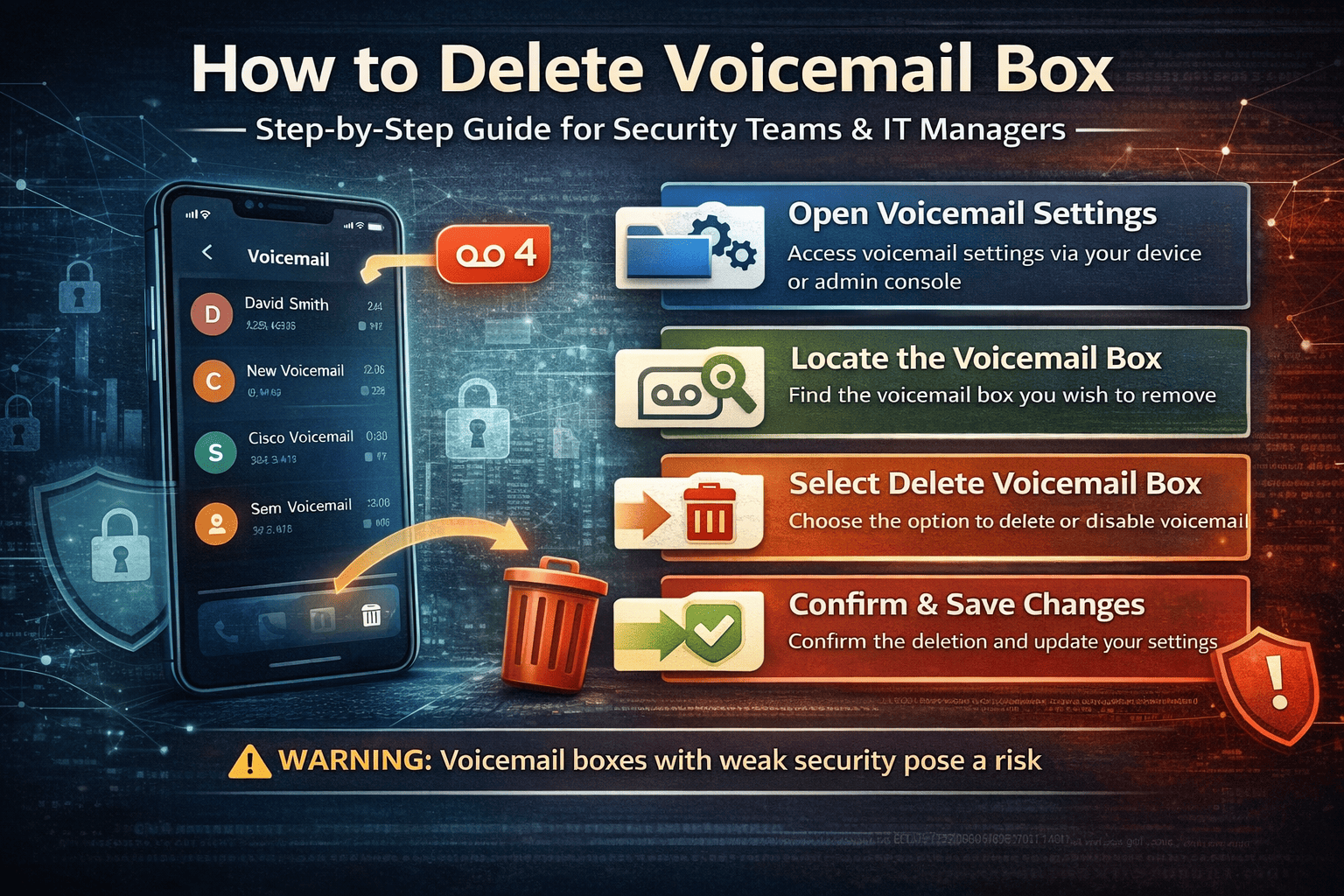
General Steps to Remove Voicemail Box
-
Log into the admin dashboard
-
Navigate to Users or Extensions
-
Select the voicemail box
-
Choose Disable Voicemail or Delete Voicemail Box
-
Save changes
This process varies by provider, but the principle remains the same.
How to Delete Voicemail Box on Enterprise Phone Systems
Enterprise PBX systems often retain voicemail boxes long after employees leave.
Best Practice for IT Teams
-
Audit voicemail boxes quarterly
-
Remove voicemail boxes for inactive users
-
Disable voicemail for roles that don’t require it
Typical Steps
-
Access PBX management console
-
Locate voicemail settings
-
Select the mailbox
-
Delete or deactivate the voicemail box
This ensures no legacy data remains accessible.
How to Disable Voicemail Entirely
In some cases, disabling voicemail altogether may be the best option.
Reasons to Disable Voicemail
-
Reduce data storage risk
-
Eliminate social engineering vectors
-
Simplify communication workflows
How to Disable Voicemail
-
Contact your carrier or VoIP provider
-
Request voicemail deactivation
-
Update call routing to forward unanswered calls
Disabling voicemail is often recommended for executive or high-risk roles.
Voicemail Management Best Practices for Organizations
Knowing how to delete voicemail box is only part of the solution. Strong voicemail governance is equally important.
Recommended Best Practices
-
Enforce strong voicemail PIN policies
-
Limit message retention periods
-
Regularly audit voicemail systems
-
Train employees on voicemail security
These steps help reduce attack surfaces across communication channels.
How Voicemail Fits Into a Broader Cybersecurity Strategy
Voicemail systems are often excluded from traditional security monitoring. That’s a mistake.
Why Voicemail Needs Security Attention
-
It’s a data repository
-
It’s accessible remotely
-
It’s often poorly monitored
Cybersecurity leaders should treat voicemail like any other endpoint—controlled, monitored, and minimized.
Common Mistakes When Deleting Voicemail Boxes
Even experienced IT teams make mistakes.
Mistakes to Avoid
-
Deleting messages but leaving the mailbox active
-
Forgetting shared or group voicemail boxes
-
Failing to revoke access credentials
-
Ignoring backups that still contain voicemail data
Avoiding these errors ensures voicemail data is truly removed.
Industry-Specific Considerations
Healthcare
Voicemail may contain protected health information (PHI). Deleting voicemail boxes is essential for compliance.
Finance
Financial discussions left in voicemail can be exploited by attackers.
Technology & SaaS
Voicemail systems often integrate with cloud platforms, increasing exposure if unmanaged.
Each industry benefits from a proactive voicemail management policy.
FAQ: How to Delete Voicemail Box
1. Can I permanently delete a voicemail box?
Yes. On VoIP and enterprise systems, admins can permanently remove voicemail boxes. Mobile devices typically allow message deletion but not full removal.
2. Is deleting voicemail messages enough?
Not always. Messages may still exist in backups or deleted folders. Deactivating the voicemail box is more secure.
3. Should companies disable voicemail?
In many cases, yes—especially for executives or sensitive roles.
4. Are voicemail boxes a cybersecurity risk?
Yes. Voicemail boxes can expose sensitive data and be exploited for social engineering.
5. How often should voicemail boxes be audited?
At least quarterly, or immediately after employee offboarding.
Final Thoughts: Why Voicemail Cleanup Is a Security Win
Understanding how to delete voicemail box isn’t just about decluttering communication systems. It’s about closing overlooked security gaps.
For IT managers and business leaders, voicemail cleanup:
-
Reduces data exposure
-
Improves compliance
-
Strengthens overall security posture
In today’s threat landscape, even small oversights can lead to major incidents.
If your organization is still managing communication systems without a unified security strategy, it’s time to modernize.
👉 See how Xcitium helps organizations eliminate hidden attack surfaces and prevent threats before they execute.
Request a demo today: https://www.xcitium.com/request-demo/