If you’ve ever noticed a small padlock icon next to a website’s address, or wondered why some URLs start with “https” instead of “http,” you’ve already brushed up against SSL and TLS. These two protocols are the invisible backbone of secure communication on the internet, protecting everything from your online banking session to a simple email login.
In this guide, we’ll break down what SSL and TLS actually are, how they work, why they matter, and what beginners and IT professionals alike need to know to keep systems secure.
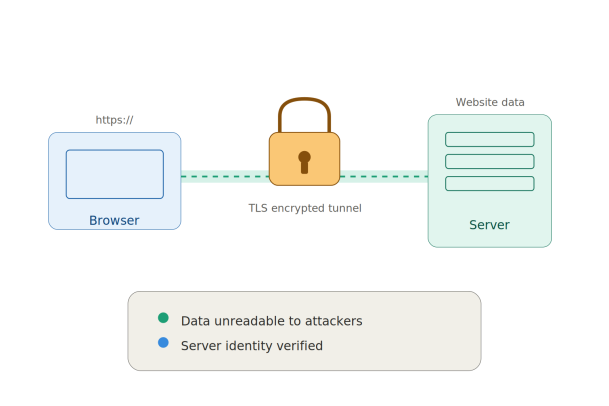
What is SSL?
SSL, or Secure Sockets Layer, was the original protocol designed to encrypt data sent between a web browser and a server. It was developed by Netscape in the mid-1990s to solve a growing problem: as more people started using the internet for sensitive activities like shopping and banking, there was no reliable way to keep that data private from prying eyes.
SSL created an encrypted link between a client (like your browser) and a server (like a website), ensuring that any data passed between them, such as passwords, credit card numbers, or personal details, remained unreadable to anyone who might intercept it.
However, SSL is now considered outdated. All versions of SSL (1.0, 2.0, and 3.0) have known vulnerabilities and have been officially deprecated by security organizations. Despite this, the term “SSL” has stuck around in everyday language, and many people still use it to refer to website security certificates, even though the technology running behind the scenes today is actually TLS.
What is TLS?
TLS, or Transport Layer Security, is the modern, more secure successor to SSL. It performs the same core function, encrypting data in transit, but does so with stronger algorithms, better performance, and fixes for the vulnerabilities that plagued SSL.
TLS has gone through several versions:
- TLS 1.0 and 1.1 – Early versions, now considered insecure and largely phased out.
- TLS 1.2 – Released in 2008, still widely used and considered secure when configured properly.
- TLS 1.3 – The current standard, released in 2018, offering faster handshakes and stronger default encryption.
When people talk about “SSL certificates” today, they are almost always referring to certificates that actually operate using TLS protocols. The naming has simply not caught up with the technology.
How Do SSL and TLS Work?
At a high level, SSL/TLS protocols work by establishing an encrypted connection through a process called a “handshake.” Here’s a simplified breakdown of what happens when you visit a secure website:
- Client Hello – Your browser contacts the server and shares which encryption methods (cipher suites) and TLS version it supports.
- Server Hello – The server responds with its chosen cipher suite and presents its digital certificate, which contains its public key.
- Certificate Verification – Your browser checks the certificate against trusted Certificate Authorities (CAs) to confirm the server is legitimate.
- Key Exchange – The client and server use asymmetric encryption briefly to securely agree on a shared symmetric session key.
- Encrypted Communication – Once the session key is established, all further data is encrypted using fast, symmetric encryption for the rest of the session.
This entire process happens in milliseconds, which is why you rarely notice it occurring, but it is doing serious work to protect your data.
Why Do SSL and TLS Matter?
1. Data Encryption
The most obvious benefit is that SSL/TLS scrambles data so that even if it’s intercepted during transmission, it can’t be read without the correct decryption key.
2. Authentication
Digital certificates verify that a website is who it claims to be. This helps prevent impersonation attacks, where a malicious actor sets up a fake website to steal user credentials.
3. Data Integrity
TLS ensures that data hasn’t been tampered with in transit. If someone tries to alter the data mid-transmission, the connection will detect the change and reject it.
4. SEO and Trust Signals
Search engines like Google factor HTTPS (HTTP over TLS) into their ranking algorithms. Sites without a valid SSL/TLS certificate are flagged as “Not Secure” in most browsers, which can damage user trust and conversion rates.
5. Regulatory Compliance
Many data protection regulations, including PCI DSS, HIPAA, and GDPR, require encryption of data in transit. Implementing TLS is often a baseline requirement for compliance.
SSL/TLS Certificates: The Basics
An SSL/TLS certificate is a digital file issued by a trusted Certificate Authority (CA) that binds a cryptographic key to an organization’s details. Common types include:
- Domain Validated (DV) – Confirms domain ownership only; fastest to obtain.
- Organization Validated (OV) – Verifies the organization behind the domain.
- Extended Validation (EV) – The highest level of validation, involving a thorough vetting process.
- Wildcard Certificates – Secure a domain and all its subdomains with a single certificate.
- Multi-Domain (SAN) Certificates – Secure multiple different domains under one certificate.
Certificates typically need to be renewed periodically, and expired certificates can cause browser warnings, broken user trust, and even downtime for critical services.
Common Misconceptions About SSL and TLS
“SSL and TLS are the same thing.” Not quite. TLS replaced SSL entirely due to security flaws, but the industry still uses “SSL” as shorthand out of habit.
“HTTPS means a site is 100% safe.” HTTPS only guarantees that the connection between your browser and the server is encrypted. It doesn’t mean the website itself is free of malware, phishing attempts, or bad actors. Attackers can and do obtain valid certificates for malicious sites.
“Once installed, TLS certificates require no maintenance.” Certificates expire, cipher suites become outdated, and configurations need regular review to stay ahead of emerging vulnerabilities like protocol downgrade attacks.
Best Practices for Implementing SSL/TLS
For IT professionals and businesses managing web infrastructure, here are some key recommendations:
- Disable outdated protocols. Turn off SSL 2.0/3.0 and TLS 1.0/1.1; only support TLS 1.2 and TLS 1.3.
- Use strong cipher suites. Prioritize forward secrecy and modern encryption algorithms like AES-GCM.
- Automate certificate renewal. Tools that handle automatic renewal reduce the risk of unexpected expirations.
- Monitor for misconfigurations. Regularly scan your servers for weak configurations using tools like SSL Labs’ SSL Server Test.
- Deploy HSTS (HTTP Strict Transport Security). This forces browsers to only connect via HTTPS, reducing the risk of downgrade attacks.
- Protect private keys. Store private keys securely, restrict access, and rotate them periodically.
SSL/TLS and the Bigger Picture of Cybersecurity
Encryption in transit is just one piece of a comprehensive cybersecurity strategy. While TLS protects data as it moves between systems, organizations also need to protect endpoints, networks, and applications from threats that exist beyond the encrypted tunnel, such as malware, ransomware, and zero-day exploits.
This is where a layered security approach becomes essential. Encrypting traffic won’t stop malware already sitting on an endpoint, and it won’t detect a compromised device attempting to exfiltrate data through a legitimate encrypted channel. Modern security strategies pair strong TLS implementation with endpoint protection, threat detection, and containment technologies to close these gaps.
Final Thoughts
SSL and TLS may operate quietly in the background, but they are foundational to how we trust and use the internet every day. Understanding the difference between the two, how the handshake process works, and how to properly implement and maintain certificates is essential knowledge for beginners just starting to explore cybersecurity, as well as seasoned professionals managing enterprise infrastructure.
As cyber threats continue to evolve, encryption alone isn’t enough. Businesses need a complete security strategy that covers endpoints, networks, and user behavior, not just the data in transit.
Ready to strengthen your organization’s security posture beyond encryption?
Request a Demo with Xcitium and see how a layered approach to cybersecurity can protect your business from threats that TLS alone can’t stop.
Please give us a star rating based on your experience.

 (17 votes, average: 2.06 out of 5, rated)


