How Does a Clinic Network Connect? A Complete Guide for Secure Healthcare Operations
Updated on December 15, 2025, by Xcitium
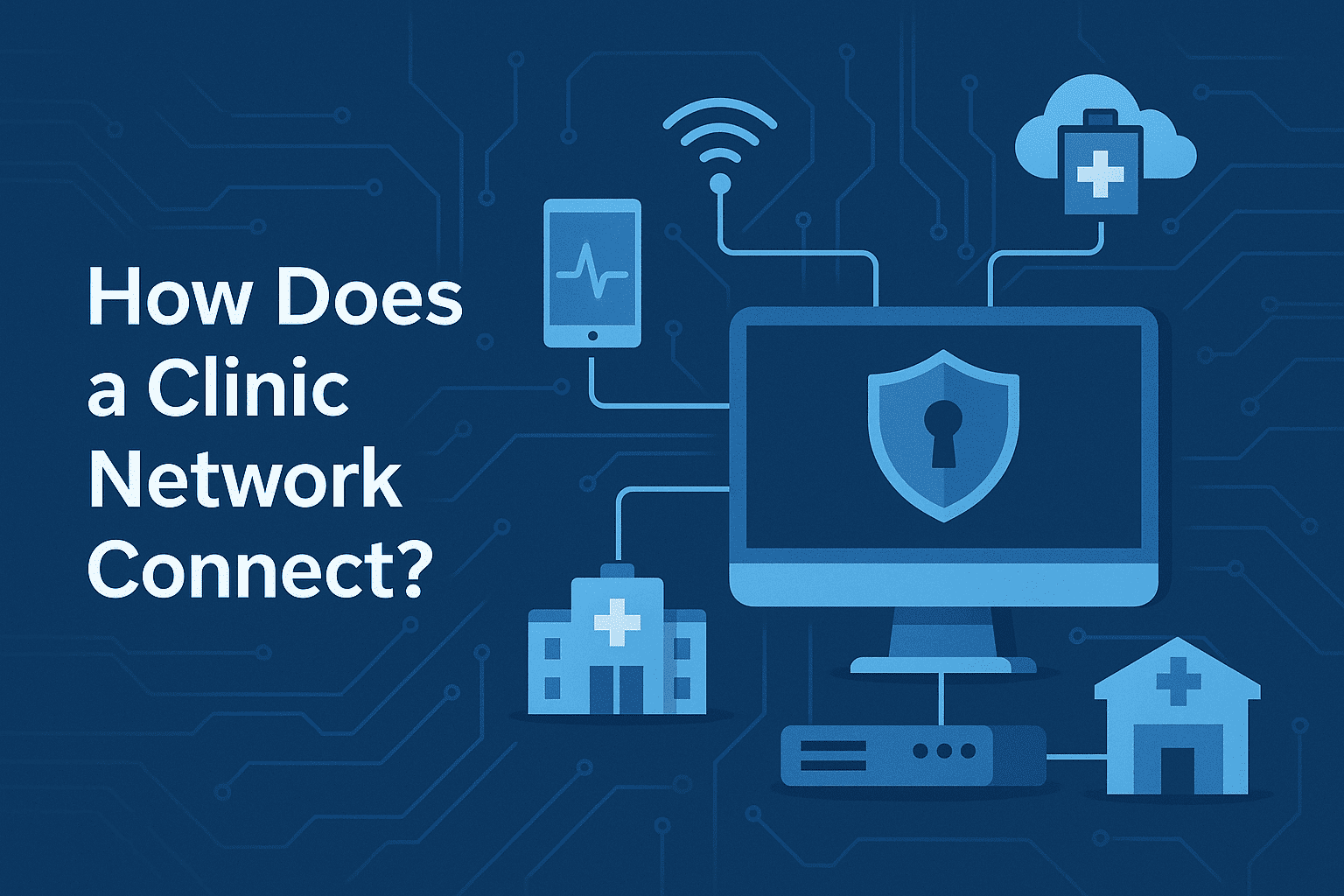
Healthcare clinics rely heavily on technology to deliver fast, accurate, and safe patient care. From electronic health records (EHRs) and imaging systems to appointment scheduling and telehealth platforms, everything depends on a reliable and secure network. That leads many IT leaders and healthcare executives to ask an important question: how does a clinic network connect all these systems while remaining secure and compliant?
A clinic network is more than just internet access. It is a carefully designed infrastructure that links medical devices, workstations, servers, cloud services, and remote locations—all while protecting sensitive patient data. As cyber threats against healthcare continue to rise, understanding how clinic networks connect and how they should be secured has never been more critical.
In this guide, we’ll explain how does a clinic network connect, explore common architectures, security requirements, compliance considerations, and best practices to help clinics build resilient, secure, and scalable networks.
What Is a Clinic Network?
Before diving into how does a clinic network connect, it’s important to define what a clinic network actually is.
A clinic network is the interconnected system of hardware, software, and communication technologies that allows clinical staff, systems, and devices to share data securely. This network supports both clinical and administrative operations.
A typical clinic network connects:
-
Computers and mobile devices
-
EHR and practice management systems
-
Medical devices and imaging systems
-
On-site servers and cloud services
-
Remote clinics and telehealth platforms
Why Clinic Network Connectivity Is So Important
Understanding how does a clinic network connect is critical because healthcare environments face unique challenges.
1. Patient Care Depends on Network Availability
Downtime can delay diagnoses, treatments, and emergency responses.
2. Sensitive Data Must Be Protected
Patient data is highly valuable and heavily regulated.
3. Clinics Use Diverse Technologies
Legacy systems, modern cloud apps, and IoT medical devices must coexist.
4. Cyberattacks Target Healthcare
Ransomware and data breaches frequently target clinics.
5. Compliance Is Mandatory
Healthcare networks must meet HIPAA and other regulatory requirements.
How Does a Clinic Network Connect? The Core Components
At a high level, how does a clinic network connect comes down to several key building blocks working together.
1. Local Area Network (LAN)
The LAN connects devices within a single clinic location.
LAN typically includes:
-
Wired Ethernet connections
-
Network switches
-
Wireless access points
This allows staff computers, printers, and medical devices to communicate locally at high speed.
2. Wide Area Network (WAN)
A WAN connects:
-
Multiple clinic locations
-
Clinics to data centers
-
Clinics to cloud services
WAN connections often use:
-
Dedicated fiber links
-
MPLS
-
Secure VPN tunnels
This is a critical piece of how a clinic network connects across locations.
3. Internet Connectivity
Clinics require internet access for:
-
Cloud-based EHRs
-
Telehealth services
-
Patient portals
-
Software updates
Internet connections must be reliable and protected with strong security controls.
4. Servers and Data Storage
Clinic networks connect to:
-
On-premises servers
-
Private cloud environments
-
Public cloud platforms
These systems store and process patient records, billing data, and clinical applications.
5. Medical Devices and IoT
Modern clinics use connected devices such as:
-
Imaging machines
-
Patient monitors
-
Diagnostic equipment
These devices must be securely integrated into the network.
Typical Clinic Network Architecture
To better understand how does a clinic network connect, let’s look at a common architecture.
1. Core Network Layer
This is the backbone of the clinic network.
-
High-performance switches
-
Firewalls
-
Routing equipment
It handles internal traffic and external connections.
2. Access Layer
This connects end devices such as:
-
Staff workstations
-
Tablets and laptops
-
Medical devices
Segmentation is often applied here to reduce risk.
3. Edge Layer
The edge connects the clinic to:
-
The internet
-
Cloud services
-
Other clinics
Firewalls and secure gateways are critical at this layer.
How Clinic Networks Connect Multiple Locations
Many healthcare organizations operate multiple clinics.
Common methods include:
1. Site-to-Site VPNs
Encrypted tunnels securely connect clinics over the internet.
2. Private WAN Services
MPLS or SD-WAN provide reliable, managed connectivity.
3. Cloud-Based Networking
Cloud hubs connect all clinic locations securely.
These approaches ensure consistent access to systems regardless of location.
Security Considerations in Clinic Network Connectivity
Security is a core concern when answering how does a clinic network connect.
1. Network Segmentation
Critical systems are separated into zones, such as:
-
Clinical systems
-
Administrative systems
-
Guest Wi-Fi
Segmentation limits the spread of cyber threats.
2. Firewalls and Gateways
Firewalls control inbound and outbound traffic and block malicious activity.
3. Encryption
Data must be encrypted:
-
In transit
-
At rest
This protects patient information from interception.
4. Identity and Access Controls
Only authorized users and devices should access clinical systems.
5. Continuous Monitoring
Networks must be monitored for suspicious behavior.
How Endpoint Security Fits into Clinic Networks
Endpoints are often the weakest link.
Clinic networks connect:
-
Staff laptops
-
Front-desk systems
-
Portable medical devices
If compromised, these endpoints can expose the entire network.
Advanced endpoint protection helps by:
-
Detecting malicious behavior
-
Isolating infected devices
-
Preventing lateral movement
Zero Trust-based endpoint containment solutions, such as Xcitium OpenEDR®, can stop threats without disrupting patient care.
Compliance and Regulations Affecting Clinic Networks
Healthcare networks must meet strict regulations.
Key compliance requirements include:
-
HIPAA (United States)
-
GDPR (EU, where applicable)
-
Local healthcare data protection laws
Network design must ensure:
-
Data confidentiality
-
Integrity
-
Availability
Failure to comply can result in heavy penalties.
Common Challenges in Clinic Network Connectivity
Understanding how does a clinic network connect also means understanding common problems.
1. Legacy Systems
Older medical devices may lack modern security features.
2. Limited IT Resources
Many clinics operate with small IT teams.
3. Downtime Risks
Network outages directly impact patient care.
4. Expanding Attack Surface
Cloud apps, remote work, and IoT increase complexity.
5. Vendor Integration Issues
Different systems may not integrate cleanly.
Best Practices for Connecting a Clinic Network Securely
To build a resilient clinic network, follow these best practices.
1. Design with Security First
Security should be built into the architecture—not added later.
2. Segment Everything
Separate critical systems from non-essential traffic.
3. Use Redundant Connectivity
Backup internet connections reduce downtime.
4. Implement Zero Trust Principles
Never trust users or devices by default.
5. Monitor Continuously
Early detection prevents small issues from becoming major incidents.
6. Regularly Update Systems
Patch network devices, servers, and endpoints.
How Cloud Technology Is Changing Clinic Network Connectivity
Cloud adoption is reshaping how clinic networks connect.
Cloud benefits include:
-
Centralized access to EHR systems
-
Easier scalability
-
Reduced on-site infrastructure
However, cloud connectivity must be:
-
Secure
-
Properly configured
-
Monitored continuously
Identity and endpoint security become even more important in cloud-connected clinics.
The Role of Zero Trust in Clinic Networks
Traditional perimeter-based security is no longer enough.
Zero Trust assumes:
-
Breaches will happen
-
Every access request must be verified
Clinic networks using Zero Trust:
-
Verify user identity continuously
-
Restrict device access
-
Contain threats automatically
This approach significantly reduces risk.
Future Trends in Clinic Network Connectivity
Healthcare networks continue to evolve.
Emerging trends include:
-
Software-defined networking (SD-WAN)
-
Cloud-first architectures
-
AI-driven network monitoring
-
Increased telehealth integration
-
Stronger identity-centric security
Clinics that adapt early gain both security and operational advantages.
Frequently Asked Questions (FAQ)
1. How does a clinic network connect different departments?
Through a local area network (LAN) with switches, access points, and network segmentation.
2. How do clinics connect multiple locations securely?
Using site-to-site VPNs, private WAN services, or cloud-based networking solutions.
3. Why is network security critical for clinics?
Because clinics handle sensitive patient data and are frequent targets of cyberattacks.
4. What role do endpoints play in clinic networks?
Endpoints are common attack entry points and must be continuously protected.
5. How can clinics reduce network downtime?
By using redundant connections, proactive monitoring, and rapid incident response.
Final Thoughts
Understanding how does a clinic network connect is essential for delivering safe, efficient, and compliant healthcare services. Clinic networks bring together devices, systems, and people across locations—but that connectivity also introduces risk.
By designing secure architectures, applying Zero Trust principles, and protecting endpoints, clinics can maintain reliable operations while defending against modern cyber threats.
👉 Want to strengthen endpoint visibility and stop threats without disrupting patient care?
Request a demo of Xcitium OpenEDR® today:
https://www.xcitium.com/request-demo/