What Is DMARC? A Complete Guide to Email Authentication and Security
Updated on February 11, 2026, by Xcitium
Email remains the #1 attack vector for cybercriminals. In fact, phishing and spoofing attacks cost businesses billions each year. That’s why many organizations are asking an important question: what is DMARC, and how does it protect email domains?
DMARC is a powerful email authentication protocol designed to prevent attackers from impersonating your domain. If you manage email systems, oversee cybersecurity, or run a business that depends on trusted communication, understanding what is DMARC is critical.
In this guide, we’ll break down what DMARC is, how it works, why it matters, how to implement it correctly, and how it fits into a broader cybersecurity strategy.
What Is DMARC?
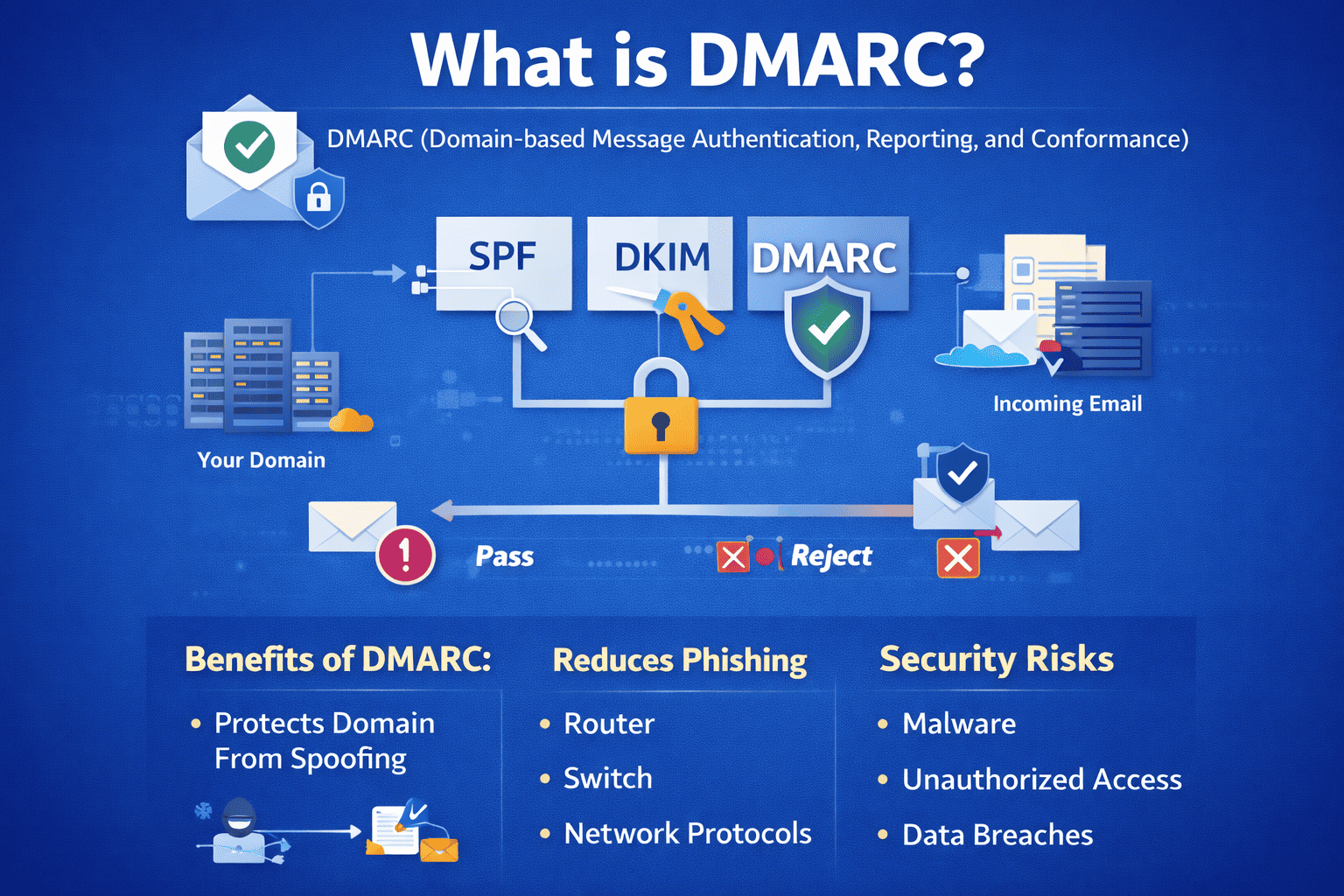
DMARC stands for Domain-based Message Authentication, Reporting, and Conformance. It is an email authentication protocol that helps protect domains from email spoofing, phishing, and impersonation attacks.
In simple terms, DMARC ensures that only authorized senders can send emails on behalf of your domain.
DMARC works alongside two other technologies:
-
SPF (Sender Policy Framework)
-
DKIM (DomainKeys Identified Mail)
Together, they create a stronger defense against email-based attacks.
Why DMARC Is Important for Businesses
Understanding what is DMARC becomes clearer when you consider the risks of email impersonation.
Without DMARC:
-
Attackers can spoof your domain
-
Customers may receive fake invoices
-
Employees may fall victim to phishing
-
Your brand reputation suffers
DMARC reduces these risks by enforcing authentication rules.
For CEOs and IT managers, DMARC is not just technical—it’s a business safeguard.
How DMARC Works
To fully understand what is DMARC, we need to look at how it operates.
DMARC builds on SPF and DKIM validation.
Step-by-step process:
-
An email is sent from your domain
-
The receiving server checks SPF and DKIM
-
DMARC evaluates alignment
-
If authentication fails, policy rules apply
-
Reports are generated for domain owners
This process happens automatically in milliseconds.
SPF and DKIM Explained
DMARC does not work alone. It depends on SPF and DKIM.
What Is SPF?
SPF verifies that the sending mail server is authorized.
It checks:
-
Whether the sender’s IP is approved
-
Whether the server matches DNS records
SPF prevents unauthorized mail servers from sending emails.
What Is DKIM?
DKIM adds a digital signature to emails.
It:
-
Confirms message integrity
-
Ensures content hasn’t been altered
-
Validates domain authenticity
Together, SPF and DKIM form the foundation of DMARC.
DMARC Policies Explained
When learning what is DMARC, understanding policies is essential.
DMARC policies tell receiving servers how to handle failed authentication.
Policy 1: p=none
-
Monitor only
-
No enforcement
-
Collects reports
Best for initial deployment.
Policy 2: p=quarantine
-
Suspicious emails go to spam
-
Reduces phishing risk
-
Partial enforcement
Good intermediate step.
Policy 3: p=reject
-
Rejects failed emails entirely
-
Maximum protection
-
Prevents spoofing
This is the strongest level of DMARC enforcement.
What Is a DMARC Record?
A DMARC record is a DNS TXT record published for your domain.
Example format:
It includes:
-
Version
-
Policy
-
Reporting address
-
Alignment rules
Proper configuration is essential.
DMARC Reporting and Visibility
One of the biggest benefits of DMARC is reporting.
Types of reports:
-
Aggregate Reports (RUA)
-
Show overall authentication results
-
Sent daily
-
Useful for analysis
-
-
Forensic Reports (RUF)
-
Detailed failure samples
-
Immediate alerts
-
Sensitive information included
-
Reports help identify unauthorized senders.
Benefits of Implementing DMARC
Organizations that understand what is DMARC often see immediate benefits.
Key advantages:
-
Prevents domain spoofing
-
Reduces phishing attacks
-
Improves email deliverability
-
Protects brand reputation
-
Increases customer trust
For IT managers, it adds visibility. For executives, it reduces risk.
DMARC and Email Deliverability
DMARC doesn’t just block threats—it improves inbox placement.
Email providers like:
-
Gmail
-
Microsoft 365
-
Yahoo
Favor domains with proper authentication.
Strong DMARC policies signal trustworthiness.
Common DMARC Implementation Challenges
While powerful, DMARC can be complex.
Common challenges:
-
Identifying all legitimate senders
-
Misconfigured SPF or DKIM
-
Breaking email flows
-
Managing third-party vendors
Improper setup can block legitimate emails.
How to Implement DMARC Safely
A phased approach is recommended.
Step 1: Audit Current Email Senders
Identify all platforms sending email.
Step 2: Configure SPF and DKIM
Ensure alignment is correct.
Step 3: Publish DMARC with p=none
Start in monitoring mode.
Step 4: Analyze Reports
Identify unauthorized senders.
Step 5: Gradually Move to p=quarantine and p=reject
This reduces disruption while increasing protection.
DMARC and Phishing Protection
Phishing attacks often rely on impersonation.
DMARC blocks:
-
Fake executive emails
-
Invoice scams
-
Business email compromise (BEC)
-
Credential harvesting attempts
This significantly lowers social engineering risks.
DMARC in Enterprise Environments
For enterprises, DMARC is essential.
Enterprise benefits:
-
Brand abuse prevention
-
Executive protection
-
Reduced fraud risk
-
Improved compliance posture
Large organizations often deploy DMARC monitoring tools.
DMARC and Compliance Requirements
Regulatory frameworks increasingly require email authentication.
Industries affected include:
-
Healthcare
-
Financial services
-
Government
-
E-commerce
DMARC supports data protection initiatives.
DMARC vs Other Email Security Tools
DMARC is not a complete email security solution.
It does not:
-
Scan attachments
-
Block malware
-
Filter spam content
Instead, DMARC prevents domain impersonation.
Layered security is still required.
Zero Trust and DMARC
Zero Trust principles apply to email.
DMARC supports Zero Trust by:
-
Verifying sender identity
-
Rejecting unauthenticated messages
-
Enforcing strict validation
It aligns well with modern security models.
Common DMARC Myths
Myth 1: DMARC stops all phishing
False. It prevents domain spoofing—not all phishing.
Myth 2: DMARC is optional
Increasingly false. Major providers now require it.
Myth 3: DMARC is difficult
It requires planning but is manageable.
Understanding what is DMARC dispels confusion.
The Future of DMARC and Email Security
Email authentication is becoming mandatory.
Trends include:
-
Mandatory DMARC for bulk senders
-
Stricter enforcement from providers
-
Greater adoption of BIMI (Brand Indicators for Message Identification)
Organizations that delay implementation risk deliverability and trust issues.
FAQs: What Is DMARC?
1. What is DMARC used for?
DMARC protects domains from email spoofing and impersonation.
2. Does DMARC stop phishing?
It prevents domain spoofing but does not stop all phishing tactics.
3. Is DMARC required?
Many email providers now strongly recommend or require it.
4. What happens if DMARC fails?
The email is handled according to policy: none, quarantine, or reject.
5. How long does DMARC implementation take?
It depends on environment complexity, typically weeks for safe deployment.
Final Thoughts: Why DMARC Is Essential
So, what is DMARC? It is a critical layer of email authentication that protects your domain, brand, and customers from impersonation attacks.
In today’s threat landscape:
-
Email remains the top attack vector
-
Brand trust is fragile
-
Compliance pressure is increasing
DMARC strengthens your organization’s email security posture while improving deliverability and visibility.
For IT leaders and executives, DMARC is no longer optional—it’s foundational.
Take the Next Step Toward Stronger Email Security
Ready to protect your domain, prevent impersonation attacks, and gain visibility into email threats?
👉 Request a demo today:
https://www.xcitium.com/request-demo/
Discover how advanced email and endpoint security solutions help organizations defend against phishing, spoofing, and evolving cyber threats.