What if a breach sat undetected in your network for months, quietly leaking data, and the only trace of it existed in a file nobody was watching? This isn’t a hypothetical — undetected security failures tied to poor visibility are a leading factor behind breaches that cost organizations millions of dollars on average. Understanding what are logging systems and how they work is one of the most overlooked yet essential foundations of a strong cybersecurity program.
For anyone focused on online security, internet security, or protecting a business network, logging isn’t just an IT housekeeping task — it’s the audit trail that makes threat detection, incident response, and compliance possible in the first place. This guide breaks down what logging actually is, why it matters, and how to build a logging strategy that works.
What Are Logging Systems, Exactly?
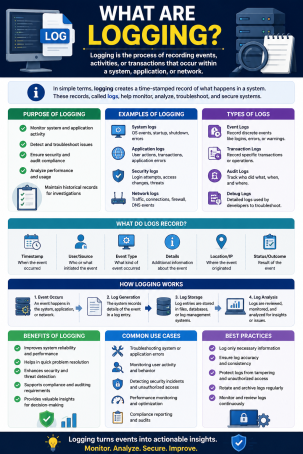
Logging is the process of automatically recording events that happen within a system, application, network, or device. Every time a user logs in, a file is accessed, a configuration changes, or an error occurs, a logging system can capture that event as a timestamped entry — creating a chronological record of everything happening across your IT environment.
These records, known as log files or log data, typically include details such as:
- Timestamp — exactly when the event occurred
- Source — which device, application, or user triggered it
- Event type — login attempt, file access, error, configuration change, etc.
- Outcome — success, failure, or an error code
On their own, individual log entries might seem mundane. But collected and analyzed together, they form the backbone of modern security monitoring — which is exactly why understanding what logging systems do is so important for anyone responsible for protecting digital assets.
Why Security Logging Matters for Cybersecurity
Security logging and monitoring failures are recognized by OWASP as one of the top risks facing modern applications, and it’s easy to see why: without reliable logs, security teams are essentially flying blind. The average cost of a data breach now runs well into the millions, and much of that cost comes from breaches that go undetected for weeks or months — time that comprehensive logging can dramatically shorten.
Key Benefits of Logging for Security Teams
- Threat detection: Logs reveal unusual login patterns, failed authentication attempts, and unauthorized access before they escalate into full-blown breaches.
- Incident response: When something does go wrong, logs provide the forensic trail needed to determine what happened, when, and how far the damage spread.
- Regulatory compliance: Frameworks like HIPAA, PCI DSS, and GDPR require organizations to maintain audit logs demonstrating who accessed sensitive data and when.
- System troubleshooting: Beyond security, logs help IT teams diagnose performance issues, application errors, and infrastructure failures.
Types of Logs Every Organization Should Know
Not all logs serve the same purpose. Understanding the different categories helps you build a logging strategy that covers your full attack surface.
Security Event Logs
These capture activity directly tied to your security posture: login attempts, firewall alerts, antivirus detections, and permission changes. They’re the first place security analysts look during an investigation.
System and Application Logs
Generated by operating systems and software, these logs track crashes, errors, resource usage, and configuration changes — useful for both security and general IT stability.
Network Logs
Routers, switches, and firewalls generate logs showing traffic flow, connection attempts, and blocked requests, which are critical for identifying reconnaissance activity or data exfiltration attempts.
Audit Logs
These track who accessed what data and when, forming the backbone of compliance reporting and internal accountability, especially in regulated industries handling sensitive customer information.
How to Build an Effective Logging Strategy
Simply turning on logging isn’t enough — the sheer volume of raw log data can overwhelm teams if it isn’t managed correctly. Here’s how to approach it strategically.
1. Identify What to Log
Not every event needs to be recorded. Prioritize high-value events: user access to sensitive data, authentication attempts, configuration changes, and security alerts. Logging everything indiscriminately creates noise that buries the signals that actually matter.
2. Centralize Log Collection
Aggregate logs from across your network — servers, endpoints, applications, and cloud services — into a single platform, often a SIEM (Security Information and Event Management) tool. Centralization makes correlation and analysis dramatically faster during an active investigation.
3. Set a Log Retention Policy
Define how long logs are stored based on regulatory requirements and your organization’s risk tolerance. Many compliance frameworks require retention periods of a year or more for audit purposes.
4. Protect Log Integrity
Logs themselves are a target for attackers looking to cover their tracks. Use write-once storage, restrict access to log files, and monitor for signs of tampering or deletion.
5. Automate Analysis and Alerting
Manual log review doesn’t scale. Use automated tools to flag anomalies, correlate events across sources, and trigger real-time alerts when suspicious patterns emerge — turning raw data into actionable intelligence.
Common Logging Mistakes That Undermine Security
- Logging too little: Skipping authentication events or access logs leaves major blind spots during an investigation.
- Logging too much without analysis: Massive log volumes with no correlation or alerting just become expensive storage with no security value.
- Ignoring log integrity: Failing to protect logs from tampering means attackers can erase evidence of their activity.
- No defined retention policy: Deleting logs too early can violate compliance requirements and destroy forensic evidence.
FAQ: What Are Logging Systems?
1. What is the difference between logging and monitoring?
Logging is the process of recording events as they happen, while monitoring is the ongoing analysis of those logs to detect patterns, anomalies, or threats in real time. Logging generates the data; monitoring puts it to use.
2. How long should security logs be retained?
Retention periods vary by industry and regulation, but many compliance frameworks require at least 12 months. Organizations handling highly sensitive data often retain logs longer to support forensic investigations.
3. What is a SIEM, and how does it relate to logging?
A SIEM (Security Information and Event Management) platform centralizes log data from across an organization’s systems, correlating events to detect threats and streamline incident response — essentially the command center for enterprise logging.
4. Can logging alone prevent a data breach?
No. Logging provides visibility and evidence, but it must be paired with active monitoring, alerting, and response capabilities to actually prevent or limit damage from a breach.
5. What types of events should small businesses prioritize logging?
At minimum, small businesses should log login attempts, access to sensitive files, administrative changes, and antivirus or firewall alerts — the events most likely to reveal early signs of compromise.
Turn Your Log Data Into Real Protection
Understanding what logging systems are is the first step — but raw log data only protects your organization when it’s actively monitored, correlated, and acted on. Without the right tools, critical warning signs can slip through unnoticed until it’s too late.
See how Xcitium’s advanced endpoint protection turns log data into real-time threat detection and response.
Request a demo today and build a security strategy that actually watches your logs for you.
Please give us a star rating based on your experience.


 (31 votes, average: 2.45 out of 5, rated)