Every major cyberattack you have read about, from ransomware shutting down hospitals to data breaches exposing millions of customer records, usually starts with a single moment: an attacker finds a weakness and uses it. That act of using a weakness is called an exploit. If you have ever wondered what does exploit mean in the world of cybersecurity, this guide breaks it down in plain language, explains how exploits work, and shows what organizations can do to stay protected.
What Does Exploit Mean?
In everyday English, to “exploit” something means to take advantage of it, often unfairly. In cybersecurity, the meaning is much more specific. An exploit is a piece of code, a sequence of commands, or a technique that takes advantage of a vulnerability in software, hardware, or a network to cause unintended behavior.
That unintended behavior could be anything from crashing an application to giving an attacker complete control of a system. The exploit itself is the “key” that fits a particular “broken lock.” Without a vulnerability, there is nothing to exploit, and without an exploit, a vulnerability remains a theoretical risk.
The word is used both as a noun and a verb. Security teams might say “a new exploit was released for this vulnerability” (noun) or “attackers exploited an unpatched server” (verb). Either way, the core idea is the same: turning a weakness into an opportunity for attack.
Vulnerability vs. Exploit vs. Payload
These three terms are often confused, but understanding the difference is essential for anyone responsible for security.
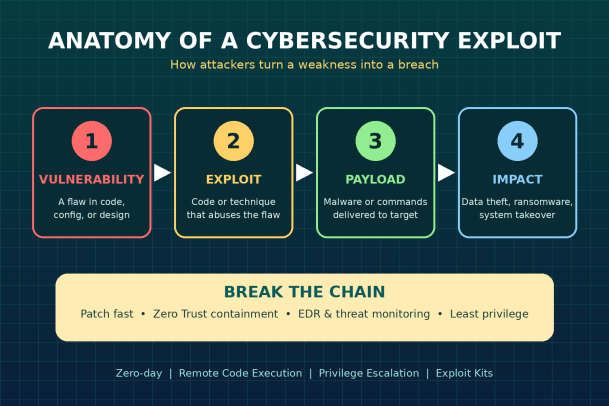
A vulnerability is a flaw or weakness. It might be a coding error, a misconfigured server, a missing security check, or an outdated protocol. Vulnerabilities exist whether or not anyone is attacking them.
An exploit is the method used to abuse that vulnerability. It is the delivery mechanism that triggers the flaw and opens the door.
A payload is what the attacker does once the door is open. This could be installing ransomware, deploying a backdoor, stealing credentials, or quietly exfiltrating data.
A helpful analogy is a house. The vulnerability is an unlocked window. The exploit is climbing through it. The payload is whatever the burglar takes or leaves behind.
How Do Exploits Work?
While every exploit is different, most attacks follow a recognizable pattern.
1. Discovery. An attacker, researcher, or automated tool identifies a vulnerability. This may come from analyzing software, reviewing public disclosures, or scanning the internet for exposed systems running outdated versions.
2. Development. The attacker builds or acquires an exploit that reliably triggers the flaw. Some exploits are written from scratch; others are purchased on underground markets or packaged in ready-made exploit kits.
3. Delivery. The exploit reaches the target. Common delivery routes include phishing emails with malicious attachments, compromised websites, malicious ads, exposed network services, and infected USB devices.
4. Execution. The exploit triggers the vulnerability, causing the system to behave in a way its developers never intended, such as running attacker-supplied code.
5. Payload deployment. Once access is gained, the attacker installs malware, escalates privileges, moves laterally across the network, or steals data.
Understanding this chain matters because defenders can interrupt it at any stage. Breaking even one link can stop an attack from succeeding.
Common Types of Cybersecurity Exploits
Exploits can be categorized in several ways, including by how they are delivered, what they target, and whether the vulnerability is already known.
Known Exploits
These target vulnerabilities that have already been publicly disclosed and usually have a patch available. Many are tracked in the Common Vulnerabilities and Exposures (CVE) system. Despite being “known,” they remain extremely dangerous because many organizations are slow to patch. Attackers routinely scan for systems still running vulnerable versions months or even years after a fix is released.
Zero-Day Exploits
A zero-day exploit targets a vulnerability that the software vendor does not yet know about, or has not yet fixed. The name comes from the fact that defenders have had “zero days” to prepare. Zero-days are highly valuable to attackers and are often used in targeted campaigns against governments, critical infrastructure, and large enterprises. Because no patch exists, traditional signature-based defenses often fail to detect them.
Remote Exploits
Remote exploits work over a network, meaning the attacker does not need prior access to the target system. These are among the most severe because they can be launched from anywhere in the world. Remote code execution (RCE) vulnerabilities, which let attackers run their own code on a victim’s machine, fall into this category.
Local Exploits
Local exploits require the attacker to already have some level of access to the system. They are frequently used for privilege escalation, turning a limited user account into an administrator or system-level account. Attackers often chain a remote exploit with a local one to gain full control.
Client-Side Exploits
These target applications users interact with, such as web browsers, PDF readers, office software, and media players. They typically rely on social engineering, tricking a user into opening a file or visiting a malicious page.
Web Application Exploits
Websites and web apps are a frequent target. Common examples include SQL injection, where malicious input manipulates a database query, and cross-site scripting (XSS), where malicious scripts are injected into pages viewed by other users.
Real-World Examples of Exploits
History shows just how damaging a single exploit can be.
EternalBlue and WannaCry (2017). EternalBlue exploited a flaw in Microsoft’s SMB file-sharing protocol. Microsoft had released a patch, but many systems remained unpatched. The WannaCry ransomware used EternalBlue to spread automatically across networks worldwide, disrupting businesses, manufacturers, and healthcare systems in a matter of days.
Log4Shell (2021). A vulnerability in Log4j, a widely used Java logging library, allowed attackers to execute code remotely by sending a specially crafted text string. Because Log4j was embedded in countless applications and services, organizations scrambled to identify where they were even using it, which highlighted the risks hidden in software supply chains.
Exploit kits in malvertising campaigns. Over the years, exploit kits have been used to silently probe visitors’ browsers and plugins for weaknesses, then automatically deliver malware without the user clicking anything beyond loading a page.
The common thread in these cases is that the damage was driven not just by the vulnerability, but by how quickly and widely it could be exploited.
Why Exploits Are So Dangerous for Businesses
Exploits give attackers a fast, often invisible entry point. Once inside, the consequences can include:
- Ransomware attacks that encrypt critical files and halt operations.
- Data breaches that expose customer information, intellectual property, and financial records.
- Regulatory penalties under data protection laws when sensitive data is compromised.
- Operational downtime that disrupts revenue and customer trust.
- Long-term persistence, where attackers remain hidden in a network for weeks or months.
The challenge is compounded by speed. Once a vulnerability is publicly disclosed, the window between disclosure and active exploitation can be very short. Security teams that rely solely on patching are often racing against attackers who are already scanning for targets.
How to Protect Against Exploits
No organization can eliminate every vulnerability, but a layered defense can dramatically reduce the risk that an exploit succeeds.
Patch and update consistently. Maintain an accurate inventory of software and devices, prioritize critical and actively exploited vulnerabilities, and apply updates as quickly as possible.
Reduce your attack surface. Disable unnecessary services, close unused ports, remove outdated software, and limit what is exposed to the internet.
Enforce least privilege. Users and applications should have only the access they need. This limits how far an attacker can go after an initial exploit.
Adopt a Zero Trust approach. Instead of assuming files and applications are safe until proven malicious, Zero Trust treats unknown items with suspicion. Technologies that isolate or contain unknown executables can stop exploit payloads from harming the system, even when the exploit itself is new.
Deploy endpoint detection and response (EDR). EDR solutions monitor endpoint behavior in real time, detect suspicious activity such as unusual process launches or privilege changes, and enable rapid response.
Segment your network. Dividing the network into zones prevents an attacker who compromises one system from moving freely to others.
Train employees. Many exploits rely on a user opening a file or clicking a link. Regular security awareness training makes phishing and social engineering far less effective.
Run vulnerability assessments and penetration tests. Regularly testing your own environment helps you find weaknesses before attackers do.
Have an incident response plan. When prevention fails, a well-rehearsed plan helps contain damage, restore systems, and meet reporting obligations.
The Role of Ethical Exploitation
Not all exploitation is malicious. Security researchers, penetration testers, and red teams use exploits legally and with permission to uncover weaknesses. Responsible disclosure programs and bug bounties encourage researchers to report vulnerabilities to vendors so they can be fixed before criminals take advantage. This “good guys exploiting first” approach is one of the most effective ways the industry stays ahead of attackers.
Conclusion
So, what does exploit mean? In cybersecurity, an exploit is the tool or technique that turns a vulnerability into a real-world attack. It is the bridge between a hidden flaw and a damaging breach. Whether it is a known exploit targeting unpatched systems or a zero-day attack no one saw coming, the risk to businesses is real and constant.
The good news is that exploits can be stopped. With consistent patching, least-privilege access, network segmentation, user training, and a Zero Trust security model that contains unknown threats before they execute, organizations can break the attack chain and keep their data, operations, and reputation safe.
Stop Exploits Before They Become Breaches
Don’t wait for the next zero-day to test your defenses. Xcitium’s Zero Trust platform isolates unknown threats in real time, so even never-before-seen exploits can’t damage your endpoints or spread across your network. See how it works for your environment.
Please give us a star rating based on your experience.


 (12 votes, average: 2.50 out of 5, rated)