Ever wished you could test new software or isolate a threat without risking your entire system? Welcome to the world of virtual machines—a game-changing technology that lets you replicate complete computer systems inside your existing hardware.
So, what is a virtual machine? It’s more than just a tech buzzword—it’s an essential tool for modern IT and cybersecurity strategies. Whether you’re managing corporate infrastructure or leading a security team, understanding virtual machines (VMs) gives you flexibility, safety, and power like never before.
What Is a Virtual Machine?
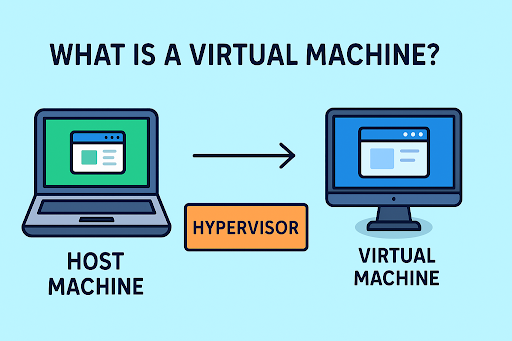
A virtual machine (VM) is a software-based emulation of a physical computer. It runs an operating system and applications just like a real machine—but inside a host system using virtualization software like VMware, VirtualBox, or Microsoft Hyper-V.
Think of it like a computer within your computer. The VM acts independently while using the host system’s physical resources—CPU, memory, storage.
Key Components:
- Host Machine: The physical hardware running the virtualization software.
- Guest Machine (VM): The emulated system that operates independently.
- Hypervisor: Software that creates and manages VMs (e.g., Type 1 or Type 2).
How Does a Virtual Machine Work?
Virtual machines are enabled by hypervisors, which allocate portions of physical hardware to simulate a full computing environment for each VM.
There are two main types:
🧱 Type 1 (Bare-Metal Hypervisor)
Installed directly on physical hardware, used in enterprise environments.
Examples: VMware ESXi, Microsoft Hyper-V Server
💻 Type 2 (Hosted Hypervisor)
Runs on top of a conventional OS.
Examples: VirtualBox, VMware Workstation
Benefits of Using Virtual Machines
Virtual machines aren’t just cool—they’re practically essential for modern IT operations.
✅ Isolation for Security
Each VM is self-contained. Malware or crashes in one VM won’t impact others or the host system.
✅ Cost Efficiency
Run multiple systems on a single piece of hardware, reducing hardware spend.
✅ Flexibility for Testing
Developers and analysts can test software or threats without risking production environments.
✅ Backup & Recovery
Snapshots make it easy to roll back systems to a previous state in seconds.
Virtual Machines in Cybersecurity
Virtual machines are a staple in cybersecurity environments. Here’s how they’re commonly used:
🔍 Malware Analysis
Security analysts use VMs to analyze malicious files safely in a sandboxed environment.
🧪 Penetration Testing
Ethical hackers deploy VMs to test system defenses without disrupting production.
🔄 Incident Response
During breaches, teams can quickly spin up VMs to investigate, isolate, or recover affected services.
🌐 Secure Browsing
VMs allow secure browsing for high-risk activities by isolating browser processes.
Real-World Example: VM Saves the Day
A SaaS company was hit by ransomware. Thanks to their VM-based infrastructure, they isolated the infected system and spun up a clean backup within 15 minutes—avoiding data loss and costly downtime.
Pro Tip: Always keep snapshot backups of your virtual machines. It could save your business from catastrophic failure.
Virtual Machine vs Container: What’s the Difference?
| Feature | Virtual Machine | Container |
| OS Dependency | Includes full OS | Shares host OS kernel |
| Resource Usage | Heavy (entire OS per VM) | Lightweight |
| Isolation | Stronger, full-system isolation | Process-level isolation |
| Startup Time | Slower (minutes) | Faster (seconds) |
Conclusion: VMs offer deeper isolation, while containers offer better performance and scalability. Many companies use both in tandem.
Common Challenges with Virtual Machines
While powerful, VMs also come with a few considerations:
- Performance Overhead: Running multiple VMs can strain host resources.
- Sprawl: Easy to create, difficult to manage if left unchecked.
- Security Risks: VMs need the same level of patching and antivirus as physical machines.
- Complex Licensing: Software licenses across VMs may be complex or costly.
Best Practices for Managing VMs
Follow these steps to optimize and secure your virtual environments:
- Limit VM sprawl: Implement VM lifecycle policies.
- Use strong credentials: Harden access to the host and hypervisor.
- Patch regularly: Apply OS and hypervisor updates.
- Enable network segmentation: Prevent lateral movement in case of breach.
- Backup routinely: Use snapshots and cloud backup solutions.
When Should You Use a Virtual Machine?
Virtual machines are ideal for:
- Software development and testing
- Running legacy apps
- Training environments
- Disaster recovery scenarios
- Simulated cyberattack labs
If you need flexibility, isolation, or scalability, VMs are your best bet.
Want to see how VMs can secure and modernize your infrastructure?
Protect your systems and data from every angle.
👉 Request your free Xcitium demo today
Frequently Asked Questions (FAQs)
1. What is a virtual machine in simple terms?
A virtual machine is a software-emulated computer that runs within a physical system, allowing you to operate multiple systems on one device.
2. Is a virtual machine safe for cybersecurity tasks?
Yes. VMs offer isolated environments ideal for malware testing, threat simulation, and secure browsing.
3. Can I run multiple virtual machines on one computer?
Absolutely. Depending on your hardware specs, you can run several VMs simultaneously using a hypervisor.
4. What are the drawbacks of using a VM?
Resource consumption, performance lag, and management complexity are common downsides if not configured properly.
5. Are virtual machines free to use?
There are free VM tools like VirtualBox, but enterprise-grade platforms (like VMware or Hyper-V) may require licensing.
Conclusion
Whether you’re an IT manager deploying scalable infrastructure, a cybersecurity pro isolating threats, or a CEO exploring cost-saving tech—understanding what a virtual machine is equips you with powerful tools for agility, safety, and innovation.
Virtual machines aren’t just a technical solution—they’re a strategic advantage in today’s digital landscape.
👉 Experience the power of virtualization. Request a demo with Xcitium
Please give us a star rating based on your experience.


 (14 votes, average: 2.36 out of 5, rated)